Du verwendest einen veralteten Browser. Es ist möglich, dass diese oder andere Websites nicht korrekt angezeigt werden.
Du solltest ein Upgrade durchführen oder einen alternativen Browser verwenden.
Du solltest ein Upgrade durchführen oder einen alternativen Browser verwenden.
Arctic Hare mod by Jussi
- Ersteller jussip
- Erstellt am
I have rewrite all the motor management on azurit so not sure i can help, but when i look at your video it's certainly a PID adjustment issue.
You need to do the test with the motor in charge to have a correct result so maybee it's better to leave the param to true, put the mower on ground and adjust the pid until it run in straight line.
You need to do the test with the motor in charge to have a correct result so maybee it's better to leave the param to true, put the mower on ground and adjust the pid until it run in straight line.
Only problem is that it wont run on the ground because that fault. Theres now these default settings
What difference is p24,p29,p32,p33,p34,p38,p45,p47 same voltage pins -> 9v vs. 9v s. - 3.3v vs. 3.3vp - 5v vs. 5vp
Code:
motorLeftPID.Kp            = 1.5;       // motor wheel PID controller
    motorLeftPID.Ki            = 0.29;
    motorLeftPID.Kd            = 0.25;
What difference is p24,p29,p32,p33,p34,p38,p45,p47 same voltage pins -> 9v vs. 9v s. - 3.3v vs. 3.3vp - 5v vs. 5vp
Hi.
I Don't understand your setting (If you use the Motor from shop the Odometry is normaly 1060 ticks/rev)
so 300 or 350 can't work normaly with the PID and the left and right wheel have trouble like in your video.
If you deactivate the Odometry into Pfod setting , normaly all need to work well.
In all case all this is not normal.
If you want you can try to upload the code join (Help with the menu helper.xlsx for motor)
After uploading it go into the PC console at 115200 bps:
send d to go in menu
send e to stop error
send l to load factory setting
send 9 to save setting in the RTC eeprom (This erase the change you have done before)
Optional:
send 0 to back
send v to swap the screen between data
Reboot all.
Now in Pfod
in setting /Mow/ forcemowing off to YES (SAFETY) and mandatory with your 2 motors
In main menu Test ODO test all the option and set the odometry according (normaly 530 or 1060 if motor from shop).
Hope it can help you to detect issue in your odometry

Attachment: https://forum.ardumower.de/data/media/kunena/attachments/3545/ardumower_2019-04-02.zip/
I Don't understand your setting (If you use the Motor from shop the Odometry is normaly 1060 ticks/rev)
so 300 or 350 can't work normaly with the PID and the left and right wheel have trouble like in your video.
If you deactivate the Odometry into Pfod setting , normaly all need to work well.
In all case all this is not normal.
If you want you can try to upload the code join (Help with the menu helper.xlsx for motor)
After uploading it go into the PC console at 115200 bps:
send d to go in menu
send e to stop error
send l to load factory setting
send 9 to save setting in the RTC eeprom (This erase the change you have done before)
Optional:
send 0 to back
send v to swap the screen between data
Reboot all.
Now in Pfod
in setting /Mow/ forcemowing off to YES (SAFETY) and mandatory with your 2 motors
In main menu Test ODO test all the option and set the odometry according (normaly 530 or 1060 if motor from shop).
Hope it can help you to detect issue in your odometry
Attachment: https://forum.ardumower.de/data/media/kunena/attachments/3545/ardumower_2019-04-02.zip/
Zuletzt bearbeitet von einem Moderator:
I'll try your code. I already tried disabling odometry and motors runs fine. Maybe theres something wrong in pcb which interference odometry/divider
That 350 is ticks after divider, actual setting in mower.cpp is 700. I ended up that by testing via console. with that setting wheels turn exactly one revolution. Both motors (from marotronics set) do same on both channels.
That 350 is ticks after divider, actual setting in mower.cpp is 700. I ended up that by testing via console. with that setting wheels turn exactly one revolution. Both motors (from marotronics set) do same on both channels.
For the Pid tunning start with D=0 and reduce I first ,if not OK put I on factory,reduce P etc.…
Unitl the 2 Wheel have the same speed.
Into Azurit the Odometry is use if you have not the IMU to go in straight line.
If you have a flat garden normaly you don't need this or the IMU.
If you have slope the IMU is a better solution.
Concerning the firmware.
It's only depend of the size and complexity of your area.
And you can test all of them but:
For my firmware all the move are Odometry control and the IMU is a GY88 and i don't want to dev again with the Azurit one (not accurate)..
For Roland raindancer you need to have 2 coils (left and right) and the perimeter control is very good ,Also it use perfectly the Odometry and very stable version.
I have tested it on 400m2 area for 2 month without any particular issue.
So TEST and see .
Unitl the 2 Wheel have the same speed.
Into Azurit the Odometry is use if you have not the IMU to go in straight line.
If you have a flat garden normaly you don't need this or the IMU.
If you have slope the IMU is a better solution.
Concerning the firmware.
It's only depend of the size and complexity of your area.
And you can test all of them but:
For my firmware all the move are Odometry control and the IMU is a GY88 and i don't want to dev again with the Azurit one (not accurate)..
For Roland raindancer you need to have 2 coils (left and right) and the perimeter control is very good ,Also it use perfectly the Odometry and very stable version.
I have tested it on 400m2 area for 2 month without any particular issue.
So TEST and see .
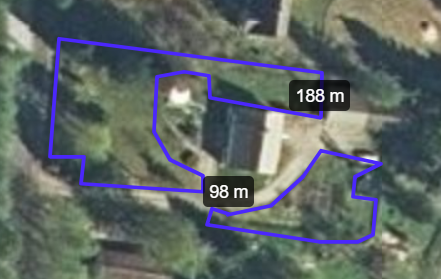
Garden is not flat and it's quite complex overall. (flowerbeds, bushes, trees and other plantings). I used map service to estimate perimeter wire lenght, image is from there. Bigger area first and maybe later smaller area.
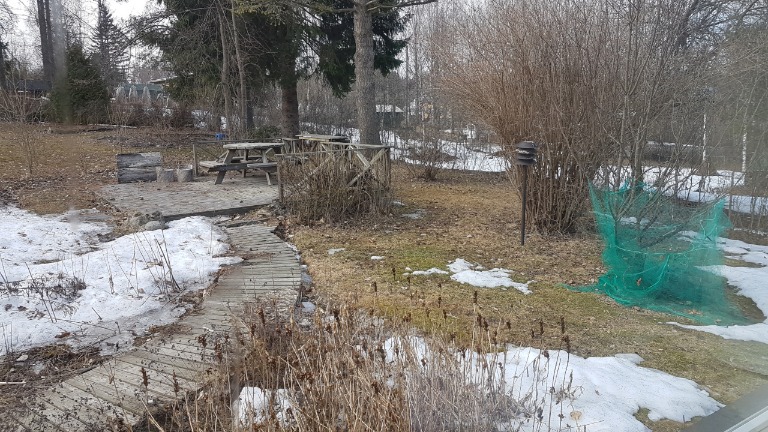
Best place for station is north end of house. Narrow spot is about 5m wide and theres big tree middle of it. I know that we have lot of mods to do in garden before robot can move there without stuck ups etc. We have still some snow on the gound and gound is in deep ice for a while. I cannot do outside tests yet
Narrow spot looks like this from the house
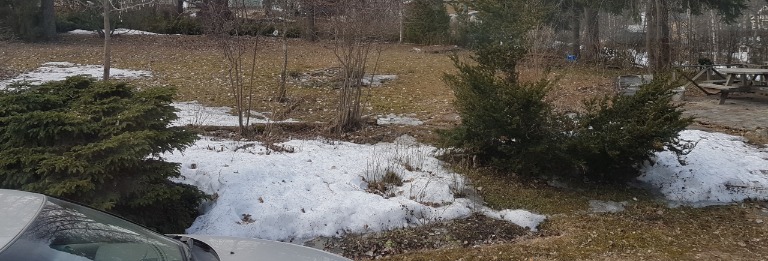
This is view to west from the house
Attachment: https://forum.ardumower.de/data/media/kunena/attachments/4741/2019-04-0515.16.19.jpg/
Best place for station is north end of house. Narrow spot is about 5m wide and theres big tree middle of it. I know that we have lot of mods to do in garden before robot can move there without stuck ups etc. We have still some snow on the gound and gound is in deep ice for a while. I cannot do outside tests yet
Narrow spot looks like this from the house
This is view to west from the house
Attachment: https://forum.ardumower.de/data/media/kunena/attachments/4741/2019-04-0515.16.19.jpg/

Zuletzt bearbeitet von einem Moderator:
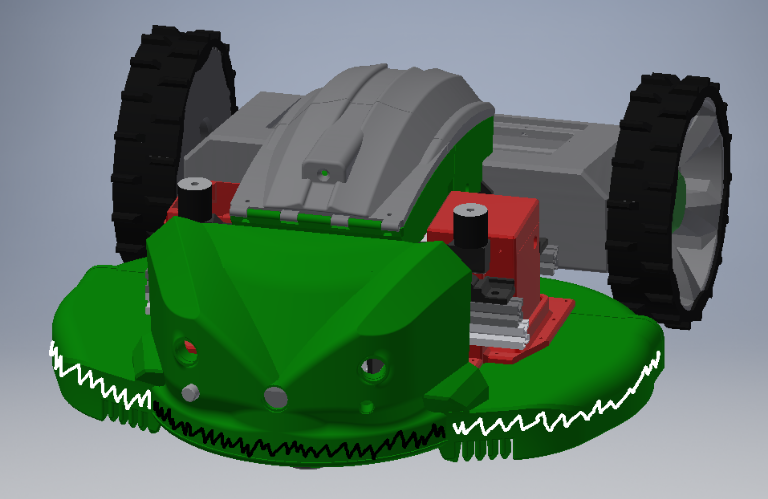
Struggling with bumper design.. I have two pressure sensors in bumperduino, is mower behaviour different when they triggered. like left trigger vs right trigger? Problem is that cover needs to separate from cut cover, so I cant put d-shape tube all the way one piece or losing capability of taking cover off easily. If another sensor tube is where black line is and another tubes where white line and connected example black to left and white ones to right
Attachment: https://forum.ardumower.de/data/media/kunena/attachments/4741/bumper.png/
Attachment: https://forum.ardumower.de/data/media/kunena/attachments/4741/bumper.png/

Zuletzt bearbeitet von einem Moderator:
Hi.
Not sure i understand all what you you want to do but
When left bumper is trigger the mower reverse and rotate right
When right bumper it reverse but rotate left
The 2 white tube can t use the same entry .
It is left and right and for the center you can use the one you want in parallel (left or right )
Not sure i understand all what you you want to do but
When left bumper is trigger the mower reverse and rotate right
When right bumper it reverse but rotate left
The 2 white tube can t use the same entry .
It is left and right and for the center you can use the one you want in parallel (left or right )