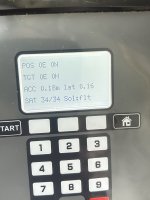
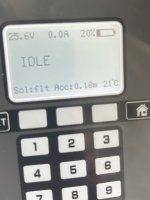
Umbau Matrix MOW800 mit Sunray

the speed should be reduced for testing purposes
Not sure if it's possible to reduce the speed of LC29HEA. Or something complex without changing the factory firmware.

I'm not sure if LC29HEA is supported by Sunray.
Yes , I test it and i can have fix result ,record map (300 m2) and mow it. Docking is more complex on my test using vicking Mi 422 ,but need more investigation to see why there is a strange 20 cm fail issue here

Video to show the perimeter recording accuracy and under big tree rtk fix

Or is the LC29HEA serial protocol compatible with ZED-F9P?
No .You need to use NMEA protocol, but it's implement into sunray , simply uncomment this line:
//#define GPS_SKYTRAQ 1 // comment out for ublox gps, uncomment for skytraq gps/NMEA

BUT i have made a lot of change into sunray code to make it compatible with teensy 4.1, so not sure it can work with other version.
ALSO actually i never have test for many days in auto mode with charging station, so i can't recommend it.
 
Not sure if it's possible to reduce the speed of LC29HEA. Or something complex without changing the factory firmware.


Yes , I test it and i can have fix result ,record map (300 m2) and mow it. Docking is more complex on my test using vicking Mi 422 ,but need more investigation to see why there is a strange 20 cm fail issue here

Video to show the perimeter recording accuracy and under big tree rtk fix


No .You need to use NMEA protocol, but it's implement into sunray , simply uncomment this line:
//#define GPS_SKYTRAQ 1 // comment out for ublox gps, uncomment for skytraq gps/NMEA

BUT i have made a lot of change into sunray code to make it compatible with teensy 4.1, so not sure it can work with other version.
ALSO actually i never have test for many days in auto mode with charging station, so i can't recommend it.
What firmware did you used on ESP32?
 
Here code locate on the esp32 receiver.:
Code:
#include <WiFi.h>
#include <WiFiUdp.h>
#include <ArduinoOTA.h>

HardwareSerial SerialGNSS(2);
HardwareSerial SerialTeensy(1);


const char* ssid = "your ssid";
const char* password = "your password";


WiFiUDP udp;
const int localPort = 5000;

// your static IP here
IPAddress local_IP(10, 0, 0, 186);
IPAddress gateway(10, 0, 0, 1);
IPAddress subnet(255, 255, 255, 0);
IPAddress dns(10, 0, 0, 1);

void setupWiFiAndOTA(const char* hostname) {
  WiFi.mode(WIFI_STA);

  // Configure l'IP fixe AVANT WiFi.begin()
  if (!WiFi.config(local_IP, gateway, subnet, dns)) {
    Serial.println("Erreur config IP statique !");
  }

  WiFi.begin(ssid, password);
  Serial.print("Connexion WiFi...");
  while (WiFi.status() != WL_CONNECTED) {
    delay(500); Serial.print(".");
  }
  Serial.println("\nConnecté! IP: " + WiFi.localIP().toString());

  ArduinoOTA.setHostname(hostname);
  ArduinoOTA.begin();
  Serial.println("OTA prête.");
}

void setup() {
  Serial.begin(460800);
  SerialGNSS.begin(460800, SERIAL_8N1, 14, 12);   
  SerialTeensy.begin(460800, SERIAL_8N1, 17, 16);

  setupWiFiAndOTA("esp32-recepteur");

  udp.begin(localPort);
  Serial.println("UDP ready, port 5000");
}

void loop() {
  ArduinoOTA.handle();

  int packetSize = udp.parsePacket();
  if (packetSize > 0) {
    uint8_t buffer[1024];
    int len = udp.read(buffer, sizeof(buffer));
    if (len > 0) {
      SerialGNSS.write(buffer, len);
      // here it's possible to send only data correction to USB
      //(to test over USB using QGNSS set up as a LC29HBS at 460800)
      //Use to know your base location
      //Serial.write(buffer, len); 
    }
  }
  // Forward data from Serial2 (GNSS) to USB Serial to test using qgnss
  while (SerialGNSS.available()) {
    uint8_t byte = SerialGNSS.read();  // Lire 1 octet depuis GNSS
    Serial.write(byte);                // Envoyer vers le port USB (pour test avec QGNSS LC29HEA at 460800)
    SerialTeensy.write(byte);          // Envoyer vers  vers Teensy
  }
}

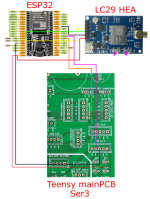
Use this wiring:
1758351138397.png
 
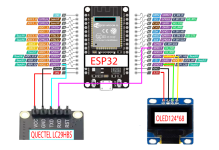
Here the sender part using LC29HBS :
Oled is not mandatory ,adjust according your connecting .


Code:
#include <Wire.h>
#include <U8g2lib.h>
#include <WiFi.h>
#include <WiFiUdp.h>
#include <ArduinoOTA.h>
#include "config.h"

#define SW_VERSION "v22"

// Exemple pour un écran SSD1306 I2C 128x64
// === OLED Reset + Init ===
#define OLED_RST 16
U8G2_SSD1306_128X64_NONAME_F_HW_I2C u8g2(U8G2_R0, U8X8_PIN_NONE, 15, 4);

HardwareSerial SerialGNSS(2);

const IPAddress remoteIP(10, 0, 0, 186);
const int remotePort = 5000;

WiFiUDP udp;


// === Affichage d’un message sur 3 lignes max ===
void oledMessage(const char* line1, const char* line2,const char* line3 = nullptr) {
  u8g2.clearBuffer();
  u8g2.setFont(u8g2_font_ncenB08_tr);
  if (line1) u8g2.drawStr(0, 16, line1);
  if (line2) u8g2.drawStr(0, 32, line2);
  if (line3) u8g2.drawStr(0, 48, line3);

  u8g2.sendBuffer();
}


void setupWiFiAndOTA(const char* hostname) {
  WiFi.mode(WIFI_STA);
  if (USE_STATIC_IP) {
    WiFi.config(LOCAL_IP, GATEWAY_IP, SUBNET_IP, DNS_IP);
  }
  WiFi.begin(WIFI_SSID, WIFI_PASSWORD);
  Serial.print("Connexion WiFi...");
  oledMessage("WiFi Connexion...", WIFI_SSID, "");
  while (WiFi.status() != WL_CONNECTED) {
    delay(500); Serial.print(".");
  }
  Serial.println("\nConnecté! IP: " + WiFi.localIP().toString());

  // Affiche l'adresse IP sur l'OLED
  String ipStr = WiFi.localIP().toString();
  oledMessage("WiFi OK", ipStr.c_str(), "");


// OTA Config
 ArduinoOTA.setHostname(hostname);

  ArduinoOTA.onStart([]() {
    oledMessage("OTA", "Mise à jour...", " ");
    Serial.println("Mise à jour OTA en cours...");
  });

  ArduinoOTA.onEnd([]() {
    oledMessage("OTA", "Terminee"," ");
    Serial.println("OTA terminée !");
  });

  ArduinoOTA.onError([](ota_error_t error) {
    oledMessage("OTA ERREUR"," "," ");
    
  });

  ArduinoOTA.begin();
  oledMessage("OTA", "Disponible"," ");


}

void setup() {
  Serial.begin(115200);
  SerialGNSS.begin(115200, SERIAL_8N1, 13, 17);
   // OLED reset
  pinMode(OLED_RST, OUTPUT);
  digitalWrite(OLED_RST, HIGH); delay(1);
  digitalWrite(OLED_RST, LOW);  delay(10);
  digitalWrite(OLED_RST, HIGH); delay(1);

  // Initialisation OLED U8g2
  u8g2.begin();
  u8g2.clearBuffer();
  u8g2.setFont(u8g2_font_6x10_tf);
  u8g2.drawStr(0, 12, "SW Version:");
  u8g2.drawStr(0, 28, SW_VERSION);
  u8g2.sendBuffer();
  delay(3000); // Affiche la version 2 secondes

  setupWiFiAndOTA("esp32-emetteur");

  // Affiche l'IP locale
  String ipStr = WiFi.localIP().toString();
  u8g2.clearBuffer();
  u8g2.setFont(u8g2_font_6x10_tf);
  u8g2.drawStr(0, 12, "Sender IP:");
  u8g2.drawStr(0, 28, ipStr.c_str());
  u8g2.sendBuffer();
  delay(3000);

  // Affiche la remoteIP
  String remoteStr = remoteIP.toString();
  u8g2.clearBuffer();
  u8g2.setFont(u8g2_font_6x10_tf);
  u8g2.drawStr(0, 12, "Remote IP:");
  u8g2.drawStr(0, 28, remoteStr.c_str());
  u8g2.sendBuffer();
  delay(3000);
}

uint32_t trameCount = 0; // compteur global

void loop() {
  ArduinoOTA.handle();

  static uint8_t buffer[1024];
  static size_t idx = 0;
  static size_t expectedLength = 0;
  static bool syncing = false;
  static uint32_t lastOled = 0;

  while (SerialGNSS.available()) {
    uint8_t b = SerialGNSS.read();

    if (!syncing) {
      if (b == 0xD3) {
        idx = 0;
        buffer[idx++] = b;
        syncing = true;
        trameCount++; // Incrémente le compteur à chaque nouvelle trame

        // Affiche le compteur sur l'OLED toutes les 4 secondes
        if (millis() - lastOled > 4000) {
          char line2[24];
          snprintf(line2, sizeof(line2), "Trames: %lu", trameCount);
          oledMessage("RTCM3 RX", line2, "");
          lastOled = millis();
        }
      }
    } else {
      buffer[idx++] = b;

      if (idx == 3) {
        expectedLength = ((buffer[1] & 0x03) << 8) | buffer[2];
        if (expectedLength > 1000) {
          syncing = false;
          idx = 0;
        }
      }

      if (idx == expectedLength + 6) {
        udp.beginPacket(remoteIP, remotePort);
        udp.write(buffer, idx);
        udp.endPacket();

        syncing = false;
        idx = 0;
      }
    }
  }

  delay(1); // Laisse du temps au WiFi/OTA
}
and the config.h

Code:
#pragma once
// === Your Wi-Fi Configuration ===
#define WIFI_SSID     "your ssid"
#define WIFI_PASSWORD "your password"
// === Static IP (optional) ===
#define USE_STATIC_IP true  // Set to false to use DHCP
// Set your Static IP address
#define LOCAL_IP      IPAddress(10,0,0,185)
#define GATEWAY_IP    IPAddress(10,0,0,1)
#define SUBNET_IP     IPAddress(255,255,255,0)
#define DNS_IP        IPAddress(10,0,0,1)

And the wiring :
1758351343143.png
 
It's UDP transfert protocol, so you need to have wifi in your garden and near base station.

For Base station
into config.h
set your SSID and your password line 3 and 4
set a valid static IP adress 185 in the sample ,mask etc according your router ip adress plan line 8 and other.
into main.ino
these 2 lines are use to select your rover, so you need to put here the ip of the rover
const IPAddress remoteIP(?, ?,?, 186); 186 in the sample
const int remotePort = 5000;

For rover
into main.ino
line9 and 10
set your ssid and password.
line 17 and after
set the static ip of the rover need the same as the one you set in the base station remote IP 186 in the sample
 
I am teammate karmo78.
Yes you can change LC29HEA UART speed:
$PAIR864,<Port_Type>,<Port_Index>,<Baudrate>*<Checksum><CR><LF>
For 115200:
$PAIR864,0,0,115200*1B
For 460800:
$PAIR864,0,0,460800*16

Check UART speed:
$PAIR865,0,0*31
Answer:
$PAIR001,865,0*30
$PAIR865,460800*17

Our Rover configuration is:
# Clear the current configuration and restore the default settings set via $PAIR
$PAIR514*3A
# clear all data
$PAIR512*3C
# restore PQTM params to default and reset
$PQTMRESTOREPAR*13
# set receiver to rover mode
$PQTMCFGRCVRMODE,W,1*2A
# save PQTM params to flash
$PQTMSAVEPAR*5A
# reboot module
$PAIR023*3B
# turn off GSA messages
$PAIR062,2,0*3C
# turn off GSV messages
$PAIR062,3,0*3D
# turn off VTG messages
$PAIR062,5,0*3B
# Enable NMEA GGA message
$PAIR062,0,01*0F
# set decimal precision for NMEA
$PQTMCFGNMEADP,W,3,6,3,2,3,2*37
# set pos output interval to 200 ms (5Hz)
$PAIR050,200*21
# save PQTM params to flash
$PQTMSAVEPAR*5A
# reboot module
$PAIR023*3B

and Basestation:
# Clear the current configuration and restore the default settings set via $PAIR
$PAIR514*3A
# clear all data
$PAIR512*3C
# restore PQTM params to default and reset
$PQTMRESTOREPAR*13
# set receiver to base mode
$PQTMCFGRCVRMODE,W,2*29
# save PQTM params to flash
$PQTMSAVEPAR*5A
# reboot module
$PAIR023*3B
# output RTCM3 MSM7 messages
$PAIR432,1*22
# output RTCM3 antenna position (1005)
$PAIR434,1*24
# set RTCM3.x output with satellite ephemeris
$PAIR436,1*26
# Enable NMEA GGA message
$PAIR062,0,01*0F
# set base location in XYZ coords (you need your own XYZ (ECEF)coordinates with correct checksum at the end)
# the following line is just an example Eiffel Tower ECEF coorinates
$PQTMCFGSVIN,W,2,0,0,4200968.566,168330.122,4780131.702*28
# save PQTM params to flash
$PQTMSAVEPAR*5A # save PQTM params to flash
# reboot module
$PAIR023*3B
# output RTCM3 MSM7 messages
$PAIR432,1*22

Check saved coordinates:
$PQTMCFGSVIN,R*26
 
Finally I and Mr. Argo got made successfully working driver and parser for lc29hea module. Looks like it’s pretty stable but doesn’t tested on the mower yet ( tested only on the bench). It needs a minor adjustment and after that it will (in few next days) published in the github.
 
Zuletzt bearbeitet:
Finally I and Mr. Argo got made successfully working driver and parser for lc29hea module. Looks like it’s pretty stable but doesn’t tested on the mower yet ( tested only on the bench). It needs a minor adjustment and after that it will (in few next days) published in the github.
I have tested (only 1 hour outdoor test under rain) your driver into my mower and it's OK using sunray and LC29HEA.
So congratulation to you and @argoso .
 
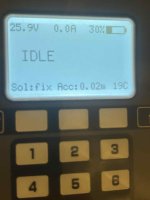
Meantime I had played with mow800 display module and made new firmware. Also added temperature sensor.1d01c550-3e31-459e-875c-9fd556c91e29.jpg
 
Zuletzt bearbeitet:
We also get working Einhell lawn mower GC-RM 500, reverse engineered PIN and so. It's in separate git branch , because I didn't want to mix in the sunray code changes (not publicly available yet). We got communication working with MSM4 messages over LoRa (local NTRIP Caster), but unfortunately the 10% duty cycle requirement from the law is difficult to meet.einhell.jpg
 
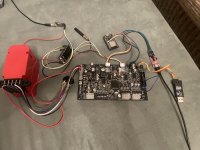
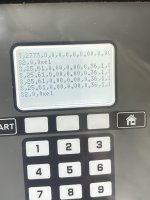
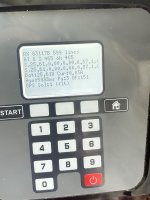
All original mow800 boards with minor modifications. Lcd board just listening uart and doesn’t send any commands to mower, it is only show data on the screen, measure internal temperature and if it’s rising critical turns off the mover. Also managed (manually and via sunray app) power on off.First hand I have to clean up the code and then I’ll publish it to github. I have to apologize for my bad English language, hopefully everyone understands what I tried to say. IMG_8446.jpegIMG_8447.jpegIMG_8448.jpegIMG_8445.jpeg
 
Oben