Du verwendest einen veralteten Browser. Es ist möglich, dass diese oder andere Websites nicht korrekt angezeigt werden.
Du solltest ein Upgrade durchführen oder einen alternativen Browser verwenden.
Du solltest ein Upgrade durchführen oder einen alternativen Browser verwenden.
Wie Raspberry Pi mit Cassandra mit PCB 1.4 verbinden?
- Ersteller eddtima
- Erstellt am
Hi, ich hatte die Probleme auch.
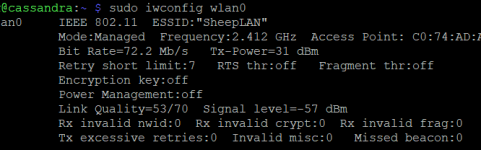
Das onboard WLAN ist nicht das Gelbe vom Ei. Und ich habe (dank Check_MK) schnell gemerkt, dass ich im Ardumower-Gehäuse ein Temperaturproblem habe.
Ein Kühlkörper der über den oberen Teil des Pi Zero geht und eine WLAN Adapter haben deutliche Besserung gebracht.
Das Ganze dann an einen USB-Hub, was weitestgehend auch läuft.
Im Augenblick Versuche ich eigentlich den UART Modus über die GPIO ans laufen zu bekommen. Weil ich mit der Hub-Lösung noch nicht so glücklich bin.
Das onboard WLAN ist nicht das Gelbe vom Ei. Und ich habe (dank Check_MK) schnell gemerkt, dass ich im Ardumower-Gehäuse ein Temperaturproblem habe.
Ein Kühlkörper der über den oberen Teil des Pi Zero geht und eine WLAN Adapter haben deutliche Besserung gebracht.
Das Ganze dann an einen USB-Hub, was weitestgehend auch läuft.
Im Augenblick Versuche ich eigentlich den UART Modus über die GPIO ans laufen zu bekommen. Weil ich mit der Hub-Lösung noch nicht so glücklich bin.
Joa, 60 Grad habe ich jetzt auch bei 34° Außentemperatur. Ab 80° fängt er an zu drosseln. Durch den Kühlkörper kann er die Wärme besser los werden.
Im Idle ging es immer... So bald er aber mähen sollte und aus dem Dock gefahren ist war nach 2 Metern Schluss.
Mit Motion hab ich eine Kamera mitlaufen die hat direkt die Übertragung abgebrochen. An der Stelle hatte ich das WLAN als Problem noch ausgeschlossen aber im weiteren Verlauf gemerkt das WLAN Roaming eher schlecht als Recht funktioniert.
Und so fummelt man sich dann durch.
Im Idle ging es immer... So bald er aber mähen sollte und aus dem Dock gefahren ist war nach 2 Metern Schluss.
Mit Motion hab ich eine Kamera mitlaufen die hat direkt die Übertragung abgebrochen. An der Stelle hatte ich das WLAN als Problem noch ausgeschlossen aber im weiteren Verlauf gemerkt das WLAN Roaming eher schlecht als Recht funktioniert.
Und so fummelt man sich dann durch.
Schwer zu sagen, ob es an der Temperatur liegt. Mein Log sagt, der RPI hat 18:49 aufgehört zu arbeiten. Bei 64,5° CPU Temperatur. Das ist eigentlich im Rahmen.
Und nach dem Neustart 22:00 hatte die CPU sogar 65°, läuft aber.
Who knows? Habe auf Morgen ein Kühlblech bestellt. Schaun mer mal.
Und nach dem Neustart 22:00 hatte die CPU sogar 65°, läuft aber.
Who knows? Habe auf Morgen ein Kühlblech bestellt. Schaun mer mal.
It's the main issue with PI, I use PI3 and 4 since 2 or 3 years in my mower and i have the same temp , >70 deg when using camera over opencv and tensorflow lite (not motion) .Schwer zu sagen, ob es an der Temperatur liegt. Mein Log sagt, der RPI hat 18:49 aufgehört zu arbeiten. Bei 64,5° CPU Temperatur. Das ist eigentlich im Rahmen.
Und nach dem Neustart 22:00 hatte die CPU sogar 65°, läuft aber.
Who knows? Habe auf Morgen ein Kühlblech bestellt. Schaun mer mal.
I don't know how motion work , but using Libcamera / Picamera2 , you can reduce the frame rate to 15/15 img/sec and reduce the CPU load.
Jap, was Bernard sagt ist auch wichtig. Ich bin mit Motion auf 10 FPS runter gegangen. Zum Mähen reicht das locker. Standardmäßig nimmt Motion auch bei Bewerbungen auf die SD Karte auf was auch abgeschaltet gehört. Die Auflösung sollte man auch nicht auf max Sport stellen. 800x600 genügen eigentlich schon.
Was mir im Augenblick mehr Kopfzerbrechen bereitet ist der Zero 2w und sein UART Port über GPIO. Ich bekomme beim besten Willen nicht über die Pins. Sobald das M4 wieder am USB Hub hängt, bekomme ich mit picocom sofort Nachrichten.
Was mir im Augenblick mehr Kopfzerbrechen bereitet ist der Zero 2w und sein UART Port über GPIO. Ich bekomme beim besten Willen nicht über die Pins. Sobald das M4 wieder am USB Hub hängt, bekomme ich mit picocom sofort Nachrichten.
CaSSAndRA spricht mit dem M4 über UART. Am USB Port meldet es sich als ttyACM0.
Hier in dem Threads wurde auch versucht die GPIO Pins abzugreifen.
Ich fand die Idee pfiffig und hätte die Erwartung gehabt, dass die Kommunikation dann wieder etwas runder läuft. Im Augenblick habe ich an den einzelnen USB Port vom Pi einen USB-Hub über den das M4 Board und der WLAN-Adapter angeschlossen ist.
Es funktioniert, aber so richtig zufriedenstellend ist das noch nicht. Ich denke ich probiere mal einen Pi 3+ den ich noch rumliegen habe und experementiere damit mal.
Hier in dem Threads wurde auch versucht die GPIO Pins abzugreifen.
Ich fand die Idee pfiffig und hätte die Erwartung gehabt, dass die Kommunikation dann wieder etwas runder läuft. Im Augenblick habe ich an den einzelnen USB Port vom Pi einen USB-Hub über den das M4 Board und der WLAN-Adapter angeschlossen ist.
Es funktioniert, aber so richtig zufriedenstellend ist das noch nicht. Ich denke ich probiere mal einen Pi 3+ den ich noch rumliegen habe und experementiere damit mal.
I always connect Teensy or AGCM4 over usb to PI3B+ or PI4 and no comm issue at all also with cassandra.
Only issue is the garden covering PI WIFI to Phone or PC and the latency of the Flask software.
I also use a Pi Zero W (not V2) inside a MI632 and TeensyBer soft ,again no comm issue.
Only issue is the garden covering PI WIFI to Phone or PC and the latency of the Flask software.
I also use a Pi Zero W (not V2) inside a MI632 and TeensyBer soft ,again no comm issue.
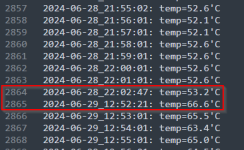
Also die Temperatur scheint nicht das Problem zu sein. Seit einigen Tagen logge ich minütlich die CPU-Temperatur in eine Datei. Freitag 22:03 Uhr hat der Raspi seinen Dienst eingestellt, bis ich ihn Samstag Mittag wieder geweckt habe.
Ich löte gerade eine Antennenbuchse an einen Raspi 4. Mal gucken, wie der sich dann verhält.
Ich löte gerade eine Antennenbuchse an einen Raspi 4. Mal gucken, wie der sich dann verhält.
Hallo Zusammen,
kommt es bei Euch auch gelegentlich vor, dass das M4 Board nicht richtig per OTA geflasht werden kann?
- erst funktioniert noch alles
- per script das .bin file versuchen auf den M4 zu flashen (schlägt fehl)
- danach meldet sich das M4 nicht mehr an den Pi als ttyACM0 an
- auch nicht nach neustart aller komponenten
- den M4 an einen Laptop per USB und 2x Reset drücken und den Bootloader neu Hochladen
Danach funktioniert das M4 wieder. Es ist halt nur nervig den Mower ständig zu öffnen.
Mit den "sleep" Zeiten im Script habe ich auch schon rumgespielt aber so 100%ig sicher läuft es eben nicht immer durch.
kommt es bei Euch auch gelegentlich vor, dass das M4 Board nicht richtig per OTA geflasht werden kann?
- erst funktioniert noch alles
- per script das .bin file versuchen auf den M4 zu flashen (schlägt fehl)
- danach meldet sich das M4 nicht mehr an den Pi als ttyACM0 an
- auch nicht nach neustart aller komponenten
- den M4 an einen Laptop per USB und 2x Reset drücken und den Bootloader neu Hochladen
Danach funktioniert das M4 wieder. Es ist halt nur nervig den Mower ständig zu öffnen.
Mit den "sleep" Zeiten im Script habe ich auch schon rumgespielt aber so 100%ig sicher läuft es eben nicht immer durch.
Code:
#!/usr/bin/env python
from __future__ import print_function
import serial, sys, time, os
from time import sleep

# CaSSAndRA stoppen
def stopService():
    try:
        #stop cassandra service
        os.popen("sudo systemctl stop cassandra.service")
        print("CaSSAndRA service terminated successfully...")

    except OSError as ose:
        print("Error while running the command", ose)

    pass
stopService()

time.sleep(5)

# command-line argument is the port the Arduino is on
serialPort = sys.argv[1]
print("Resetting the Arduino Leonardo/Micro at {}... ".format(serialPort), end="")

# First we open and close the port at some normal baudrate.
ser = serial.Serial(port=serialPort, baudrate=9600)
ser.close()

# Now, we open the port at the magic 1200 baud.
ser.baudrate = 1200
ser.open()

# Tricky, completely undocumented bit: RTS must be HIGH and DTR LOW.
# Otherwise absolutely nothing happens!
# ...yeah, I know.
ser.setRTS(True)
ser.setDTR(False)

# Close the 1200 baud connection, triggering a reset of the Arduino.
# The bootloader will run for 8 seconds (14 blinks).
ser.close()

# yay!!!
print("done.")

# Addendum: If this is used right before uploading new code,
# we need to give the bootloader some time to start up.
time.sleep(5)

# Uebertragen der Daten an dem M4
os.system('bossac -i --port=/dev/ttyACM0 -U -i --offset=0x4000 -w ~/sunray.ino.grand_central_m4.bin -R')

time.sleep(5)

# CaSSAndRA starten
def startService():
    try:
        #start cassandra service
        os.popen("sudo systemctl start cassandra.service")
        print("CaSSAndRA service started successfully...")

    except OSError as ose:
        print("Error while running the command", ose)

    pass
startService()Hi,
ich habe nur ein Skript zum Resetten:
Den REst mache ich in der (Putty-) Konsole:
Erst:
~/arduino_reset.py /dev/ttyACM0
Dann:
bossac -i --port=/dev/ttyACM0 -U -i --offset=0x4000 -w ~/sunray.ino.bin -R
Viele Grüße,
Jürgen
ich habe nur ein Skript zum Resetten:
Code:
#!/usr/bin/env python
from __future__ import print_function
import serial, sys
from time import sleep

#
# Arduino Leonardo/Micro automatic software reset tool.
#
# Calvin Li, 2015-04-03
#


# command-line argument is the port the Arduino is on
serialPort = sys.argv[1]
print("Resetting the Arduino Leonardo/Micro at {}... ".format(serialPort), end="")


# First we open and close the port at some normal baudrate.
ser = serial.Serial(port=serialPort, baudrate=9600)
ser.close()


# Now, we open the port at the magic 1200 baud.
ser.baudrate = 1200
ser.open()

# Tricky, completely undocumented bit: RTS must be HIGH and DTR LOW.
# Otherwise absolutely nothing happens!
# ...yeah, I know.
ser.setRTS(True)
ser.setDTR(False)

# Close the 1200 baud connection, triggering a reset of the Arduino.
# The bootloader will run for 8 seconds (14 blinks).
ser.close()

# yay!!!
print("done.")


# Addendum: If this is used right before uploading new code,
# we need to give the bootloader some time to start up.
# time.sleep(2)
Den REst mache ich in der (Putty-) Konsole:
Erst:
~/arduino_reset.py /dev/ttyACM0
Dann:
bossac -i --port=/dev/ttyACM0 -U -i --offset=0x4000 -w ~/sunray.ino.bin -R
Viele Grüße,
Jürgen

Mr. Tree
Well-known member
Habe ich auch... Manchmal... Ich schätze mal bei 100 mal flashen geht es schief obwohl geflasht wurde. Fw lädt nicht, mower bleibt aus. Wird auch nicht mehr vom USB abgesteckten Gerät erkannt .. ob OTA oder nicht. Erst der 2malige resetbutton hilft. Manchmal läuft es ewig, manchmal hab ich das Gefühl das es sich häuft. Dann passiert es 2 mal in einer Session das ich ihn reinholen muss.
@Mr. Tree
danke Dir... dann bin ich wenigstens nicht völlig auf dem Holzweg
Bei mir kommt es schon sehr verstärkt vor. Erst dachte ich die Sleep Time hätte was bewirkt weil es 5x hintereinander gut ging... aber in zwischen denke ich, dass es nicht das script ist. jklotzek nutzt im wesentlichen das gleiche script.
In einem Nebensatz eines Github issue fiel der Hinweis, dass der "modemmanager" nicht laufen sollte da er beim erscheinen des ttyACM0 Port den selbigen für ein paar sekunden blockieren kann.
@jklotzek
Evtl. könntest du mal schreiben, ob der dienst bei dir läuft
Ich habe ihn mal vollständig deinstalliert und werde berichten wie es so läuft
danke Dir... dann bin ich wenigstens nicht völlig auf dem Holzweg
Bei mir kommt es schon sehr verstärkt vor. Erst dachte ich die Sleep Time hätte was bewirkt weil es 5x hintereinander gut ging... aber in zwischen denke ich, dass es nicht das script ist. jklotzek nutzt im wesentlichen das gleiche script.
In einem Nebensatz eines Github issue fiel der Hinweis, dass der "modemmanager" nicht laufen sollte da er beim erscheinen des ttyACM0 Port den selbigen für ein paar sekunden blockieren kann.
@jklotzek
Evtl. könntest du mal schreiben, ob der dienst bei dir läuft
systemctl status ModemManager.serviceIch habe ihn mal vollständig deinstalliert und werde berichten wie es so läuft
probier doch auch mal den aktuellsten Bootloader hier (uf2 nicht bin file verwenden) beim M4

 github.com
hatte eine Zeit lang auch immer wieder das Problem das der sich aufhängt, der neue läuft seit dem ohne Probleme.
github.com
hatte eine Zeit lang auch immer wieder das Problem das der sich aufhängt, der neue läuft seit dem ohne Probleme.
Release v3.16.0 - turn off dotstar at end, fix compiler warning, add Trinkey SHT4x · adafruit/uf2-samdx1
What's Changed do not leave dotstar on after exiting bootloader by @rlcamp in #208 Update cdc_enumerate.c by @NasserN in #205 nu trinkey by @ladyada in #211 New Contributors @rlcamp made their f...
github.com