Raspberry-PI als WLAN-Router für Ardumower (Idee)

Cooe Idee Ihn auch als Hotspot einzurichten, wenn Wlan Hotspot einzurichten, wenn Netzt Verfügbar ist.

Hier habe ich was zu sudo Problem gefunden:

sudowebscript.sh

Jetzt fehlt nur noch die Anzeige / Einstellung der Parameter und Steuerung ;)

Stefan
 
Müsste dann in etwa so aussehen. ungetestet !


Code:
#!/bin/bash
#
# sudo web script allowing user www-data to run commands with root privilegs

case "" in
    killall)
        killall 1
    ;;
    cp)
        cp 1 2
    ;;
    dnsmasq)
        /etc/init.d/dnsmasq 1
    ;;
    ifdown)
        ifdown 1
    ;;
    ifup)
        ifup 1
    ;;
    wpacat)
        cat /etc/wpa_supplicant/wpa_supplicant.conf
    ;;
    wpascan)
        wpa_cli scan
    ;;
    wpascanresult)
        wpa_cli scan_results
    ;;
    hostapd)    
        /etc/init.d/hostapd 1
    ;;
    
    *) echo "ERROR: invalid parameter:  (for ___SNIPPET___)"; exit 1 ;;
esac

exit 0
 
Hi Alexander.

First important note that it's the first time i use a Paspberry ,Python or PHP
And also I follow your TUTO with Google translate because don't know German.

I use Windows 10 and a Rasberry PI3 .

Here small remark than maybe can help Beginner.

The Beginner problem i have and solve.
Each time there is command line Google translate it so need to pay attention Example Sudo is different sudo.
In Uploader.py to put the correct ARDUINO_BUILD_DIR i use copy and past from Windows but
Windows use '' to separe to folder and Python '/' i spent 1 hour on this simple problem. Grrrrrr
Don't know why but the Hostname rasberrypi is correct in the dmesg but never work on my PC i always need to use the IP adress.
EDIT
Finaly i solve this issue:
Need to install SAMBA on the PI so Windows can view the Hostname
sudo apt-get install samba
Now no problem with DHCP
END EDIT


Here small problem i have with Nano board and need explain or help.

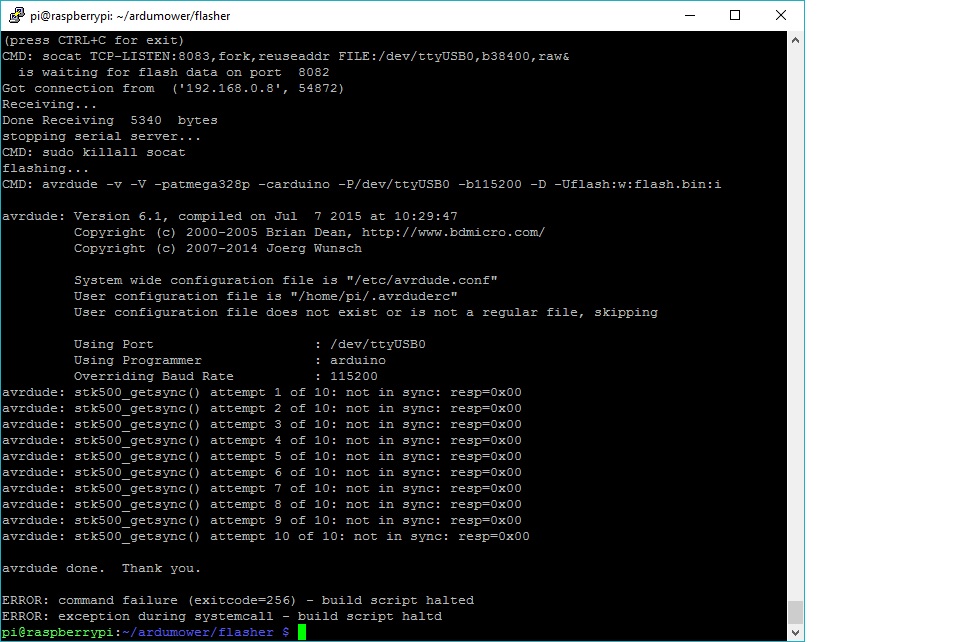
At first i begin all my test with a Nano board and i can't make avrdude work in manual mode.
The nano is detect as ttyUSB0 so i compile a flash.bin for nano download it in the PI3 and type.
avrdude -v -V -patmega328p -cwiring -P/dev/ttyUSB0 -b115200 -D -Uflash:w:flash.bin:i.
or
avrdude -v -V -patmega328p -carduino -P/dev/ttyUSB0 -b115200 -D -Uflash:w:flash.bin:i.
But it never work Timeout error each time. :evil:


nanoavrdude.jpg


After i test with Mega and it's work very well with Python 5.5 chapter
The mega is detect as ttyACM0 so what is difference ttyACM0 vs ttyUSB0 ?? i compile a flash.bin for mega download it in the PI3 and type.
avrdude -v -V -patmega2560 -cwiring -P/dev/ttyACM0 -b115200 -D -Uflash:w:flash.bin:i
And it's work each time. :)
The Uploader.py and flasher.py work very well. :)

At this point i test the 5.6 chapter
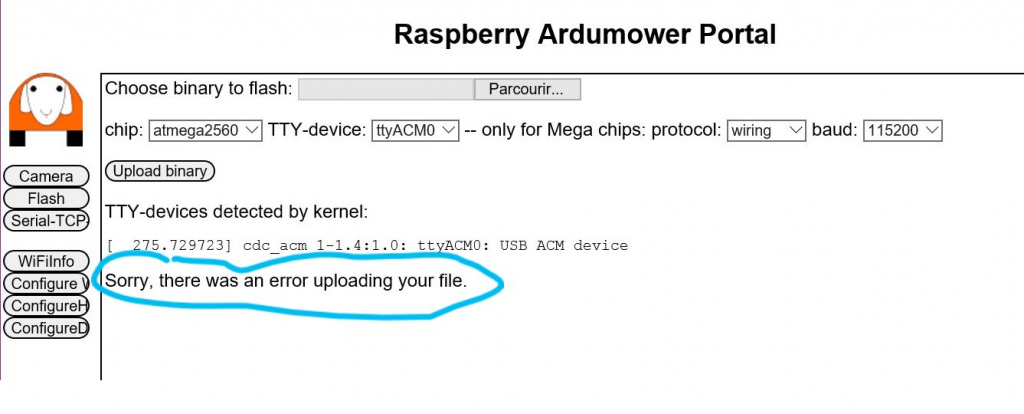
The connection is OK Serial TCP and reset Arduino work but flash don't work .


erroruploading.png


Is there Something to change in PHP ??

Congratulation for the TUTO and thanks again because the most important work.
Attachment: https://forum.ardumower.de/data/media/kunena/attachments/3545/nanoavrdude.jpg/
 
Zuletzt bearbeitet von einem Moderator:
ich habe mal den sudo code eingebaut, damit es ein wenig sicher ist.

Die Datei sudowebscript.sh nach /var kopieren

in die /etc/sudoers

sudo nano /etc/sudoers

www-data ALL=NOPASSWD:/var/sudowebscript.sh

eintragen


Stefan
 
Hello Boilevin,

In order to flash an Arduino Nano, this should work:

avrdude -v -V -patmega328p -carduino -P/dev/ttyACM0 -b57600 -D -Uflash:w:flash.bin:i

Regarding your PHP problem, find out your HTML root folder (where your index.html is stored, either /var/www or /var/www/html ), and modify all occurences in the PHP script accordingly. Inside this html folder, create a new upload folder:
sudo mkdir /var/www/uploads
And allow The www-data user to write there:
sudo chmod o+w /var/www/uploads

Finally, your uploads should work.

Regards,
Alexander
 
Hi Alexander

Thanks for your quick answer.

Pb 1 Solve
For the nano the avrdude -v -V -patmega328p -carduino -P/dev/ttyUSB0 -b57600 -D -Uflash:w:flash.bin:i
work, in fact the speed can't be 115200 and the ttyACM0 is ttyUSB0
Thanks.

Pb 2 solve
It's the location of uploads folder

need to put the uploads in the html folders and it's work.

sudo mkdir /var/www/html/uploads

Great to change it in the Tuto Chapter 5.6.

Thanks again.


By.
Thanks for your help
 
Hi All.
Hope i correctly understand.

In the PHP Solution you don't read the console like in Python via Putty and Telnet.
What is the Serial TCP why start and stop ( maybee for Due only).

Is there a solution to view the Arduino console like with putty but with the possibility to send char like 'd' in Azurit.

Flash the Mega work perfectly.

Another question.
Concerning the Power of the PI
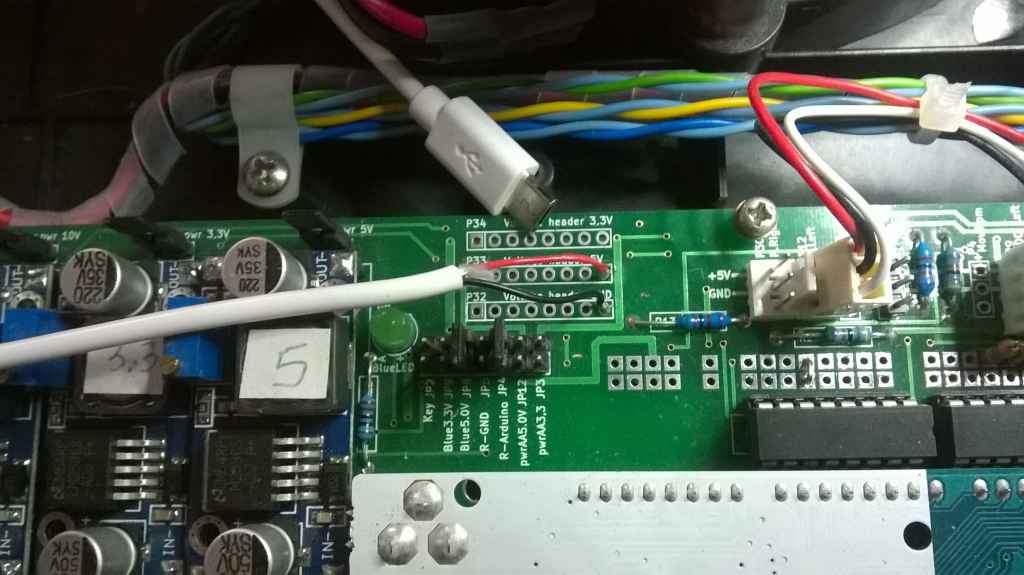
i thing you use the 5V of the 1.2 PCB for the PI and did you cut a micro USB cable to connect the PI at the board or connect directly to the GPIO

Thanks
 
Hi Boilevin,

the path /var/www/html/uploads was an errot in my Code, sorry the correct path ist /var/www/uploads

It was corrected in my last post.

Stefan
 
Hallo

Tolles Projekt mit der Himbeere.

Meine Fragen dazu.
Brauche ich zwingend ein Arduino Due oder reicht ein Mega aus ?
Geht als Kamera auch eine Webcam ?


MfG
André
 
Hi Stephan

I create the two path because i think Alexander use one and you the other ,no
All is working correctly with web.zip and php method.

To read the console finally i use a very simple solution.
I find a lot of tuto on the web on VNC and Teamviewer
i install arduino ide into the PI3 and use his console
VNC or Teamviewer is used to view the PI screen .


Something Strange the PI arduino ide can't compile the azurit code it's a too old version i think.


Thanks.
 
Hallo,

ein RPi als Webserver ansich ja eine gute Idee, aber ist der RPI nicht ein wenig 'oversized'?
Konsequent wäre Ihm gleich auch andere Zeitkritische aufgaben zu übergeben, native kommunikationskanäle sind ja genug vorhanden (spi, i2c Usart), ein paar Gpio sind ja auch noch frei.
Gerade hinsichtlich der ParticleFilter wäre der RPI2 mit seiner 4Kern CPU und 1GB Ram Ideale Besetzung
Man könnte sogar komplett die Arduino IDE auf dem Raspi laufen lassen und über VPN dann über ein Android Tablet Programmieren .

Gruss Micha
 
Danke Alexander.

Dann werde ich mich mal dran machen.

Wie habt Ihr die Spannungsversorgung zum Pi gemacht ? Über USB oder GiO?


Mfg
André
 
Hi michael.

I try to program the mega with RPI arduino IDE but it didn' t work.

The RPI arduino IDE fail to compile the Azurit.

Or my Arduino IDE version is not the good one but i think it's the last one (2.1.0.5 + dfsg2-4).

I use the PHP script to flash and the Arduino IDE via VNC to view the console.

By
 
Oben