How I reduce vibration when tracking

@Alex: never mind, you can first try the 1st changes (Videos are made with only these changes) the second set of changes are not yet tested anyway.
or you can download the files from Github for testing.

@Alexander: I am not shure we want to avoid the "dead' band, since when working with the perimeterMag, this band is not dead. I think the high Integral part just makes it smooth.
In theory this can also be reached with the original code. Now I am thinking maybe just a simple perimeterPID.reset() every time a transition occurs would smooth out the reaction of the perimeterPID controller.
I tried controlling on perimeterMag last year at 90% and the result was very unstable, since the magnetic field is not always at the same strenght ( for example at 90deg turns) and the measurement is noisy. My mower was even start to walk backwards and shaking violently. Maybe we can try this approach again, but there are again 2 points where controller could go for 1 before the maximum(in the field) and 1 after the maximum(at the perimeter), which makes again an unstable system. Additionally it's much more easy to control on the steep angle of the curve than on the flat.
My main goal was getting a stable system where the distance to the perimeter is used as controller input.
 
Bernard schrieb:
On Github in your code there are 2 state for the tracking
If blockinnerwheel=true in pfod

line 235 236 the mower lost the wire so it's hard angle so 1 wheel is near stop (/6) and the other (/2) PID is not use
You can gently change the /2 by /1.8 /1.5 etc..... the /6 can be stay or replace all the motorSpeedMaxPwm/6 by 0 to find quicly the wire but not smooth.

line 271 272 you are on the wire so the PID is used it's straight line
You can gently change the /2.3 by /2 /1.8 /1.5 ...

This change increase the speed but need to be adapt with your motor and perimeter pid.

Will be this part of code "if ((millis() > stateStartTime + 5000) && (millis() > perimeterLastTransitionTime + trackingPerimeterTransitionTimeOut)){"
still valid when trackingPerimeterTransitionTimeOut was increased to 10000?
 
Zuletzt bearbeitet von einem Moderator:
No it's not here.
If you can wait i try to make the part of perimeter function with all the detail in the code so you can copy and paste in azurit.
and try with your mower.
 
@Alda.
Can you try to just replace this line in azurit in motorControlPerimeter() line 946 to be sure

Code:
perimeterPID.w = 0;

by

Code:
if (perimeterInside) {
  perimeterPID.w = -0.5;
   }
  else {
    perimeterPID.w = 0.5;
  }

and test
 
just made a few tests. The sun came out.
first i tested with fixed magMax. this gives not the same result.The locked in feeling is not there.
I could not go as fast as with the floating permimeterMagMedian.getHighest()

With the permimeterMagMedian.getHighest() in the perimeter control loop it is more stable. I can get to /1.7 without problem. maybe /1.5 is possible.
I think the floating MagMax makes the system more stable.
I guess the number of samples of permimeterMagMedian.getHighest() and the divider have to be adjustable. I will revert the latest Github change and go from there.
Perimeter tracking control loop:

Code:
void Robot::motorControlPerimeter(){    
  if (millis() < nextTimeMotorPerimeterControl) return;
    nextTimeMotorPerimeterControl = millis() + 30;

  if ((millis() > stateStartTime + 5000) && (millis() > perimeterLastTransitionTime + trackingPerimeterTransitionTimeOut)){
    // robot is wheel-spinning while tracking => roll to get ground again
    if (trackingBlockInnerWheelWhilePerimeterStruggling == 0){
    if (perimeterInside) setMotorPWM( -motorSpeedMaxPwm/2, motorSpeedMaxPwm/2, false);
        else setMotorPWM( motorSpeedMaxPwm/2, -motorSpeedMaxPwm/2, false);}

    else if (trackingBlockInnerWheelWhilePerimeterStruggling == 1){
      if (perimeterInside) setMotorPWM( motorSpeedMaxPwm/6, motorSpeedMaxPwm/2, false);
        else setMotorPWM( motorSpeedMaxPwm/2, motorSpeedMaxPwm/6, false);
    }

    if (millis() > perimeterLastTransitionTime + trackingErrorTimeOut){      
      Debug.println("Error: tracking error");
      addErrorCounter(ERR_TRACKING);
      //setNextState(STATE_ERROR,0);
      setNextState(STATE_PERI_FIND,0);
    }
    return;
  }   
  perimeterPID.x = 5*((double(perimeterMag)/double(perimeterMagMedian.getHighest())));
  if (perimeterInside){
      perimeterPID.w = -1;
      if (!lastPerimeterTrackInside) perimeterPID.reset();
      lastPerimeterTrackInside = 1;
  }
    else{
      perimeterPID.w = 1;
      if (lastPerimeterTrackInside) perimeterPID.reset();
      lastPerimeterTrackInside = 0;
    }
  //if (perimeterPID.x > 1) perimeterPID.x = 1;
  //else if (perimeterPID.x < -1) perimeterPID.x = -1;
  perimeterPID.y_min = -motorSpeedMaxPwm;
  perimeterPID.y_max = motorSpeedMaxPwm;		
  perimeterPID.max_output = motorSpeedMaxPwm;
  perimeterPID.compute();
  //setMotorPWM( motorLeftPWMCurr  +perimeterPID.y, 
  //               motorRightPWMCurr -perimeterPID.y, false);      
  setMotorPWM( max(-motorSpeedMaxPwm, min(motorSpeedMaxPwm, motorSpeedMaxPwm/1.7 - perimeterPID.y)), 
                 max(-motorSpeedMaxPwm, min(motorSpeedMaxPwm, motorSpeedMaxPwm/1.7 + perimeterPID.y)), false);      
  /*Console.print(perimeterPID.x);
  Console.print("t");          
  Console.println(perimeterPID.y);  */
}

this was working well with
P:8.3
I:11.8
D:0
never needed a transition timeout going all the way around the perimeter
this is the second half of my perimeter. after 1 minute it gets interesting. With increased speed and perimeterMagMedian.getHighest() see code above.
https://youtu.be/ldShBUqqAVw
 
Bernard schrieb:
@Alda.
Can you try to just replace this line in azurit in motorControlPerimeter() line 946 to be sure

Code:
perimeterPID.w = 0;

by

Code:
if (perimeterInside) {
  perimeterPID.w = -0.5;
   }
  else {
    perimeterPID.w = 0.5;
  }

and test

not working

https://youtu.be/bujXhhIPvWA
 
Zuletzt bearbeitet von einem Moderator:
Hi,
I have built in this from Boilevin (thanks for the idea) into my code.


Code:
// PID controller: track perimeter 
void Robot::motorControlPerimeter()
{    
  if (millis() < nextTimeMotorPerimeterControl)
    return;
  
  nextTimeMotorPerimeterControl = millis() + 50;

  
  ///////////////////////////////////////////////////////  
  //Boilevin:
  if (perimeterInside)
  {
    perimeterPID.x = float(perimeterMag) / 1500;
    if (perimeterPID.x > 1)
      perimeterPID.x = 1;
  }
  else
  {
    perimeterPID.x = float(perimeterMag) / 1500;
    if (perimeterPID.x < -1)
        perimeterPID.x = -1;
  }
  
  Console.print("perimeterPID.x = ");
  Console.print(perimeterPID.x);

  //////////////////////////////////////////////////////
    
  perimeterPID.w = 0;
  perimeterPID.y_min = -motorSpeedMaxPwm / 2;
  perimeterPID.y_max = motorSpeedMaxPwm / 2;    
  perimeterPID.max_output = motorSpeedMaxPwm / 2;
  perimeterPID.compute();
  //setMotorPWM(motorLeftPWMCurr  +perimeterPID.y, 
  //            motorRightPWMCurr -perimeterPID.y, false);      
  setMotorPWM(max(-motorSpeedMaxPwm, min(motorSpeedMaxPwm, motorSpeedMaxPwm / 2 - perimeterPID.y)), 
              max(-motorSpeedMaxPwm, min(motorSpeedMaxPwm, motorSpeedMaxPwm / 2 + perimeterPID.y)), false);      
  /*Console.print(perimeterPID.x);
  Console.print("t");          
  Console.println(perimeterPID.y);  */
}


However, I just use a shieldbuddy as a controller. It is not finished yet, but it works very well.
Here an old video of first tests: -->Video

I will upload new videos soon...


VG
Reiner
 
new video with first group of modifiactions and PID 13,5 / 6 / 0,8 (but I think can be a 0)
https://youtu.be/oVDx8RFDTpE
bumper off, sonar off
strange are vidible stops, I don't know reason of this stops.....

sorry for wrong orientation

Alex
 
@Alda.
Here how to test with my code
First you need to create and add value to new variable.
To do this it's easy
You have to define variable in robot.h
You have to set a value in mower.cpp

variables you need to create
perimeterMagMaxValue
rightSpeedperi
leftSpeedperi
lastTimeForgetWire
MaxSpeedperiPwm

in robot.h
in the section perimeter state

Code:
int leftSpeedperi;
    int rightSpeedperi;
    unsigned long lastTimeForgetWire;
    int MaxSpeedperiPwm;
    int perimeterMagMaxValue;


in mower.cpp

Code:
perimeterMagMaxValue = 2000; // Maximum value return when near the perimeter wire (use for tracking and slowing when near wire
    MaxSpeedperiPwm = 160; // speed max in PWM while perimeter tracking


And the function you need to replace with one tonne of comment


Code:
//PID controller: track perimeter
void Robot::motorControlPerimeter() {

//3 states
//wire is lost
//On the wire staright line pid fast action
//Back slowly to the wire pid soft action


//Control the perimeter motor only each 30ms
  if (millis() < nextTimeMotorPerimeterControl) return;
  nextTimeMotorPerimeterControl = millis() + 30; //possible 15ms with the DUE
  //tell to the pid where is the mower   (Pid.x)
  perimeterPID.x = 5 * (double(perimeterMag) / perimeterMagMaxValue);
  //tell to the Pid where to go (Pid.w)
  if (perimeterInside) {
  perimeterPID.w = -0.5;
  }
  else {
    perimeterPID.w = 0.5;
  }
  //parameter the PID 
  perimeterPID.y_min = -motorSpeedMaxPwm ;
  perimeterPID.y_max = motorSpeedMaxPwm ;
  perimeterPID.max_output = motorSpeedMaxPwm ;
//and compute
  perimeterPID.compute();


//First state wire is lost
//important to understand TrackingPerimeterTransitionTimeOut It's if during this maximum duration the robot does not make a transition in and  out then it is supposed to have lost the wire, the PID is stopped to go into blocking mode of one of the two wheels. 
// If the trackingPerimeterTransitionTimeOut is too large the robot goes too far out of the wire and goes round in a circle outside the wire without finding it


// If the second condition is true the robot has lost the wire since more trackingPerimeterTransitionTimeOut (2500ms) for example it is then necessary to stop one of the 2 wheels to make a half turn and find again the wire
  if ((millis() > stateStartTime + 10000) && (millis() > perimeterLastTransitionTime + trackingPerimeterTransitionTimeOut)) {
     
	//If this condition is true one of the 2 wheels makes backward the other continues with the result of the PID (not advised)
	if (trackingBlockInnerWheelWhilePerimeterStruggling == 0) { //
      if (perimeterInside) {
        rightSpeedperi = max(-MaxSpeedperiPwm, min(MaxSpeedperiPwm, MaxSpeedperiPwm / 2  + perimeterPID.y));
        leftSpeedperi = -MaxSpeedperiPwm / 2;
      }
      else {
        rightSpeedperi = -MaxSpeedperiPwm / 2;
        leftSpeedperi = max(-MaxSpeedperiPwm, min(MaxSpeedperiPwm, MaxSpeedperiPwm / 2 - perimeterPID.y));
      }
    }
	//If this condition is true one of the 2 wheels stop rotate the other continues with the result of the PID (advised)
    if (trackingBlockInnerWheelWhilePerimeterStruggling == 1) {
      if (perimeterInside) {
        rightSpeedperi = max(-MaxSpeedperiPwm, min(MaxSpeedperiPwm, MaxSpeedperiPwm / 2  + perimeterPID.y));
        leftSpeedperi = 0;
      }
      else {
        rightSpeedperi = 0;
        leftSpeedperi = max(-MaxSpeedperiPwm, min(MaxSpeedperiPwm, MaxSpeedperiPwm / 2 - perimeterPID.y));
      }
    }
	
	//send to motor
    setMotorPWM( leftSpeedperi, rightSpeedperi, false);
    // we record The time at which the last wire loss occurred
    lastTimeForgetWire = millis();
// if we have lost the wire from too long time (the robot is running in a circle outside the wire we stop everything)
    if (millis() > perimeterLastTransitionTime + trackingErrorTimeOut) {
      Console.println("Error: tracking error");
      addErrorCounter(ERR_TRACKING);
      //setNextState(STATE_ERROR,0);
      setNextState(STATE_PERI_FIND, 0);
    }
	// out of the fonction until the next loop  
    return;
  }


 // here we have just found again the wire we need a slow return to let the pid temp react by decreasing its action (perimeterPID.y / 2)
  if ((millis() - lastTimeForgetWire ) < trackingPerimeterTransitionTimeOut / 1.5 ) {
    rightSpeedperi = max(0, min(MaxSpeedperiPwm, MaxSpeedperiPwm / 2 +  perimeterPID.y / 2));
    leftSpeedperi = max(0, min(MaxSpeedperiPwm, MaxSpeedperiPwm / 2 -  perimeterPID.y / 2));
 }
  else
//we are in straight line the pid is total and not/2
  {
    rightSpeedperi = max(0, min(MaxSpeedperiPwm, MaxSpeedperiPwm/1.5   + perimeterPID.y));
    leftSpeedperi = max(0, min(MaxSpeedperiPwm, MaxSpeedperiPwm/1.5  - perimeterPID.y));
    
  }

  setMotorPWM( leftSpeedperi, rightSpeedperi, false);


  //if the mower move in perfect straight line the transition between in and out is longuer so you need to reset the perimeterLastTransitionTime
    
if (abs(perimeterMag ) < perimeterMagMaxValue/4) { 
    perimeterLastTransitionTime = millis(); //initialise perimeterLastTransitionTime in perfect sthraith line
  }

  
}


Hope this can help
 
Hi Drolli.
I remark that you have let the nextTimeMotorPerimeterControl = millis() to 50ms.
I don't know excatly how work the ADCMAN but you can do a simple test.
Use a very fast value for example 10 ms and write in the console the value of the perimeterMag.
If the value change each 10 ms you win and can have a better tracking.
In the mega if i remenber it's take 30 40 ms to read the mag
With the DUE it's 15 ms
and i wait to see if this board is also fast in this king of operation.
By
 
@ do you mean 90deg angle? No I don't. (it is the second cable I put down, so can learn)
all 90 deg angles are 2x 45deg

I am little scared the wheels will form a rail in the soil. It goes everytime excatly to the same line.
 
@Holoratte
You have reason 2x45 is better and avoid the transition timeout
I am little scared the wheels will form a rail in the soil. It goes everytime excatly to the same line.
Tracking works too well but don't worry it's a mower and not only a tracking robot.:p :p :p
Alexander say
(percent) as set-point for the tracking?
etc...
I think maybe it's difficult to track 1 meter Inside the wire but i view that Roland post a video with this kind of working so why not.

The best problem after that is to find the station because it's on the wire ??
 
I not yet have a station- so NO PROBLEM :cheer:
I thought Roland have two coils.
This would be very tricky on a Mega...
Maybe with a Due only for the two coils
 
Hi Bernard,
I've tried it. Every 10ms a different value... (only in my workshop, with sender switched off)


Code:
PerimeterMag: millis=11159/ mag=-170
PerimeterMag: millis=11169/ mag=-202
PerimeterMag: millis=11179/ mag=184
PerimeterMag: millis=11189/ mag=-185
PerimeterMag: millis=11199/ mag=-164
PerimeterMag: millis=11209/ mag=-212
PerimeterMag: millis=11219/ mag=-239
PerimeterMag: millis=11229/ mag=168
PerimeterMag: millis=11239/ mag=-222


the ADCMan is running on a seperate core at 200MHz.

bye
Reiner

***EDIT***
Video online -> here
 
Bernard schrieb:
@Alda.
Here how to test with my code


Hope this can help

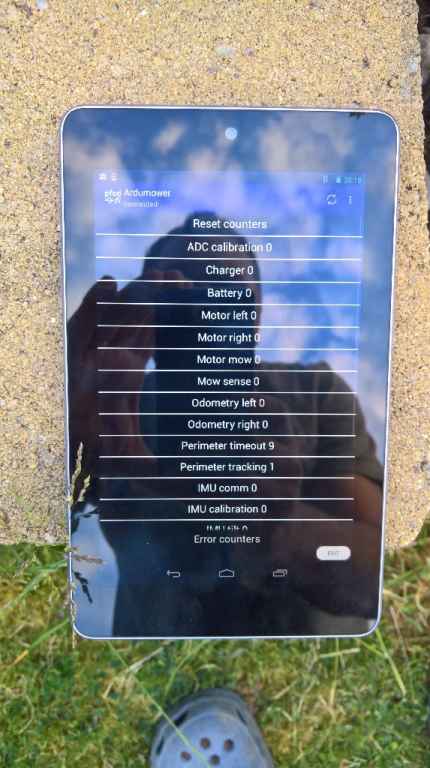
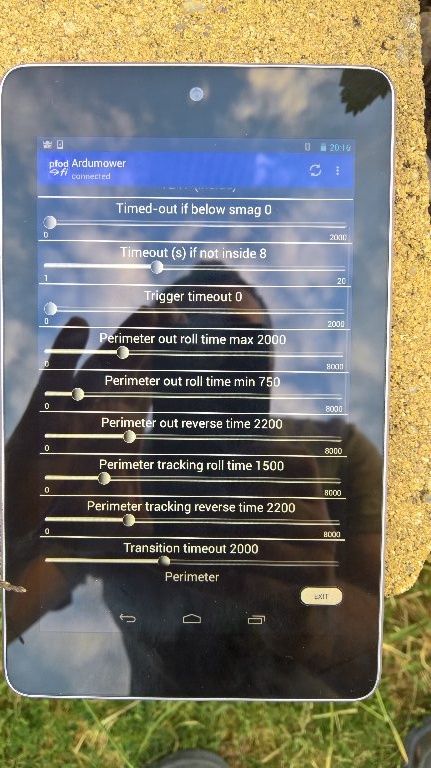
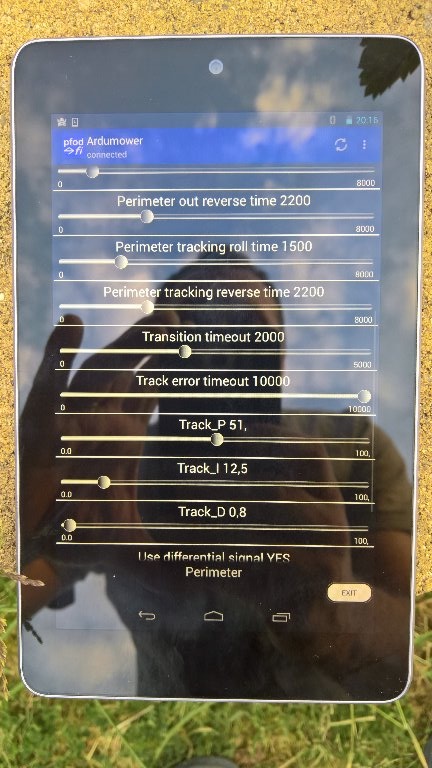
Very good, very smooth, but after few seconds error :
https://youtu.be/TwYiS8CX2XE
WP_20170605_20_15_58_Rich.jpg


and setup :
WP_20170605_20_16_29_Rich.jpg

WP_20170605_20_16_41_Rich.jpg

Attachment: https://forum.ardumower.de/data/media/kunena/attachments/1183/WP_20170605_20_15_58_Rich.jpg/
 
Zuletzt bearbeitet von einem Moderator:
Oben