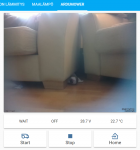
Arctic Hare mod by Jussi

Today i have made the change in the Mqtt startup sequence and use Qos=1 to be sure connection is OK.
New button to start and stop the video feedback, Value are only send on change.
The most strange was that when Pyardu start it get the time date from Raspbian ,but 30 or 50 second later the time is auto update from the net and this can change all from the delay to start Mqtt.
It's work on table(y), now need to test in real mowing condition:oops:.
Pyardu410 is the same as Pyardu411 except the console log more complete.
See GitHub:
 
What happen if mower goes out of wifi range? Pi freeze? My mower is still inside and can't test that easily..
Edit: there's network check now, maybe nothing happens..

Lovelace is nice but quite complicate sometimes :D Why picture can't be two column wide
ha_ardumower.png<<
 
What happen if mower goes out of wifi range? Pi freeze?
Normaly no :rolleyes:
It's rain again but I have tested this by deactivate the Wifi on the Pi and it's work the soft stop to send data and retry connection each 2 minutes.
It's work like that:
On each publish, a message id is generate and the broker send a callback with the same id.
Using this behaviour i can detect if the connection is broken and stop to send message.
I use also your code to test the WIFI and reactivate the Mqtt if WIFI is back.;)

I also had an IDLE with the Loop/s each 5 seconds, So you can add it in Lovelace to see if the result is OK (New value each 5 seconds).
Code:
platform: mqtt
   name: "Mower Idle"
   state_topic: "Mower/Idle"
It' certainly possible to add code in HASSIO to check the 5 Seconds non stop changing value from loop/s by HOW ??:unsure:
I want to manage my 8 sprinklers station using ESP8266 or ESP32 and 8CH relay. but ia m new on Home assistant and Yaml
but until now the tasmota and ESP8266 fail to start when i use GPIO reverse pin :cry:

Need more and more Test.
 
Check if states.sensor.mower_idle.last_changed or states.sensor.mower_idle.last_updated is more than 5 seconds to do something in automation script. What you are trying to do?
 
Your lovelace page is perfect for me (y)(Can you share the lovelace config part ?
I think it's good to add Something in your page to toggle the video Stream and to know if the mower is connected or not (So maybe possible with the automation you describe, but i Don't know how to do that (Also if possible to force the mower in the station if the internet weather is rain I need to add a COMMAND/PAUSE/24 for example to stop timer for the next 24 Hours)


My final goal is to control my 8 sprinkler (ESP8266 8CH relay and HA irrigation) and the mower using the internet weather but maybe too complex for my HA knowledge ??o_O
 
ui-lovelace.yaml
Code:
  ##### ArduMower #####
  - title: "ArduMower"
    # icon: mdi:robot-mower-outline
    # panel: true
    path: ardumower
    cards:
      - type: vertical-stack
        cards:
          - type: picture-entity
            entity: camera.ardumower_camera
            camera_view: live
            show_name: false
            show_state: false
          # - type: picture-glance
          #   title: "ArduMower"
          #   camera_image: camera.ardumower_camera
          #   show_state: true
          #   entities:
          #     - entity: sensor.mower_status
          #       name: "Status"
          #     - entity: sensor.mower_state
          #       name: "State"
          #     - entity: sensor.mower_battery
          #       icon: mdi:current-dc
          #     - entity: sensor.mower_temperature
          #       icon: mdi:temperature-celsius
          - type: horizontal-stack
            cards:
              - type: glance
                # title: "ArduMower"
                show_icon: false
                show_name: false
                entities:
                  - entity: sensor.mower_status
                    name: "Status"
                  - entity: sensor.mower_state
                    name: "State"
                  - entity: sensor.mower_battery
                    name: "Voltage"
                    icon: mdi:current-dc
                  - entity: sensor.mower_temperature
                    name: "Temperature"
          - type: horizontal-stack
            cards:
              - type: entity-button
                name: "Start"
                icon: mdi:robot-mower-outline
                icon_height: 30px
                entity: switch.mowerstart
                tap_action:
                  action: toggle
              - type: entity-button
                name: "Stop"
                icon: mdi:stop
                icon_height: 30px
                entity: switch.mowerstop
                tap_action:
                  action: toggle
              - type: entity-button
                name: "Home"
                icon: mdi:home-import-outline
                icon_height: 30px
                entity: switch.mowerhome
                tap_action:
                  action: toggle
          # - type: horizontal-stack
          #   cards:
          #     - type: gauge
          #       entity: sensor.mower_battery
          #       name: "Battery voltage"
          #       max: 35
          #       min: 20
          #       severity:
          #         green: 25
          #         red: 23
          #         yellow: 24
          #     - type: gauge
          #       entity: sensor.mower_temperature
          #       max: 100
          #       min: 10
          #       severity:
          #         green: 20
          #         red: 60
          #         yellow: 50

Bigger 'system' in home assistant is better to put in package. Same file everything ardumower related there (execpt lovelace)
/home/homeassistant/.homeassistant/packages/ardumower.yaml
Code:
##### SENSOR SECTION #####
sensor:
  - platform: mqtt
    name: "Mower State"
    state_topic: "Mower/State"
    force_update: True
  - platform: mqtt
    name: "Mower Status"
    state_topic: "Mower/Status"
    force_update: True
  - platform: mqtt
    name: "Mower Battery"
    state_topic: "Mower/Battery"
    unit_of_measurement: "V"
    force_update: True
    value_template: "{{ value_json | round(1) }}"
  - platform: mqtt
    name: "Mower Temperature"
    state_topic: "Mower/Temp"
    unit_of_measurement: "°C"
    force_update: True
    value_template: "{{ value_json | round(1) }}"

##### SWITCH SECTION #####
switch:
  - platform: mqtt
    name: "MowerStart"
    command_topic: "Mower/COMMAND/"
    payload_on: "START"
    payload_off: "START"
    qos: 0
    retain: false
  - platform: mqtt
    name: "MowerStop"
    command_topic: "Mower/COMMAND/"
    payload_on: "STOP"
    payload_off: "STOP"
    qos: 0
    retain: false
  - platform: mqtt
    name: "MowerHome"
    command_topic: "Mower/COMMAND/"
    payload_on: "HOME"
    payload_off: "HOME"
    qos: 0
    retain: false

##### CAMERA SECTION #####
camera:
  - platform: generic
    name: "ArduMower Camera"
    still_image_url: http://192.168.1.14/picture/1/current/
    stream_source: http://192.168.1.14:8081
 
Can you clarify.
In my fresh setup of hassio i have a config directory and the configuration.yaml is locate Inside.
I have create a packages subdirectory Inside config and put a file named ardumower.yaml with your code Inside.
So

Config
----Packages
-----------ardumower.yaml

In the configuration.yaml i Don't know how to create the link ???
I try config: !include packages/ardumower.yaml ,Check config is OK restart but it's Don't work The content of ardumower.yaml is not loaded ??

Code:
# Configure a default setup of Home Assistant (frontend, api, etc)
default_config:

# Uncomment this if you are using SSL/TLS, running in Docker container, etc.
# http:
#   base_url: example.duckdns.org:8123

# Text to speech
tts:
  - platform: google_translate
config: !include packages/ardumower.yaml
group: !include groups.yaml
automation: !include automations.yaml
script: !include scripts.yaml
scene: !include scenes.yaml

frontend:
  themes: !include_dir_merge_named themes

For lovelace i add to Simply paste your code in my lovelace config
 
Yes, sorry forgot that :) all other is correct

configuration.yaml
Code:
homeassistant:
  packages: !include_dir_named packages
 
Something strange on docking/charging again. eeprom, rtc errors and about 10 sec after state charging, waitchdog reset
 
Something strange on docking/charging again. eeprom, rtc errors and about 10 sec after state charging, waitchdog reset
Into Arduremote setting Station :
Option Restart after charging (If set to yes The mower use the watchdog to reset when the charging finish) but normaly without any error.
I have increase the watchdog timeout in the last version (see the last commit On Git.)

Maybe a bad contact in station can stop the charging and generate the error.
Try to deactivate this option and check the console on a full 5 h charging cycle.

And tell me.
 
Bad contact is good place to start (y) Several imu tilt errors today w/o any real tilt.. I have 4 sec. watchdog timeout now.
 
Several imu tilt errors today w/o any real tilt
Do you use the last version, Normaly this issue is solve and only a console message show the bad reading ?
If you have increase the watchdog timeout you need also increase the Delay into
void Robot::autoReboot() {
I set the watchdog at 5 sec and delay at 20 secondes
The mower run yesterday and today with MQTT command and not a good wifi in area without particular issue.
 
More testing. No imu errors but rtc reading errors this time. Maybe battery is drained out
Code:
09:57:10 All Console file are saved
09:57:08 All Console file are saved
09:57:06 $RMSTA,474583,6,-2174.72,-87.55,-2.13,26.29,-2.13,0.09,-0.03,13.90,1,*7e

09:57:06 INCOMING MESSAGE ERROR FROM DUE
09:57:05 ERROR / ERR
09:57:05 Robot Stats address Stop = 826
09:57:05 Robot Stats address Start = 800
09:57:04 Save Robot Stats
09:57:04 RTC data error!
09:57:04 DS1307 comm error
09:57:00 $RMSTA,468825,32,-2006.59,16.92,-2.13,26.28,-2.13,0.09,-0.03,13.90,1697,*5f

09:57:00 INCOMING MESSAGE ERROR FROM DUE
09:57:00 NORMALMOWING / FRWODO
09:57:00 No rain in last 60 minutes
09:56:59 $RMSTA,466993,19,-1978.22,34.55,-2.13,26.28,-2.13,0.09,-0.03,13.90,1673,*5a
 
Zuletzt bearbeitet:
rtc was broken, new one seems to work for now. How that compass calibration goes? Can I do it inside?
gyro cal. looks this:
Code:
20:52:07 THE NEW OFFSET ax: -3378 ay: 277 az: 1887 gx: 122 gy: 23 gz: -12
20:52:07 FINISHED reading Value with new offset,If all is OK need to be close 0 exept the az close to 16384 New reading ax: 0 ay: 4 az: 16386 gx: -1 gy: -1 gz: 1
 
I try again :D just thinking can I do compass cal. inside house where might be some interference
Everything seems to work on piardu but still some error messages? any idea why?
Code:
08:15:54 $RMSTA,938846,32,2299.53,-1591.81,0.35,27.74,0.35,0.05,0.00,28.90,16292,*40

08:15:54 INCOMMING MESSAGE ERROR FROM DUE
08:15:54 NORMALMOWING / FRWODO
08:15:52 $RMSTA,937346,19,2279.16,-1634.92,0.70,27.74,0.67,0.06,0.06,28.90,16261,*43

08:15:52 INCOMMING MESSAGE ERROR FROM DUE
08:15:52 NORMALMOWING / POUTFOR
08:15:50 $RMSTA,935329,21,2263.12,-1644.23,2.47,27.76,2.44,-0.03,0.05,28.90,16214,*6f
 
Zuletzt bearbeitet:
Hi
The gyro use gravity so no issue in your house .
For the error message you need to comment the try cath part on serial read and uncomment the green parts.
Start with console to see the real error code .Near line 418
 
Oben