Arctic Hare mod by Jussi

There's no errors in console, that's why it's confusing message.. But that part was wrong 'commented'
Sorry for Console i mean Python Idle Terminal .
For debug you need to do this and check terminal
Code:
  else :  # here a nmea message
                
                print(mymower.dueSerialReceived)
                message = pynmea2.parse(mymower.dueSerialReceived)
                decode_message(message)
                """
                try:
                    message = pynmea2.parse(mymower.dueSerialReceived)
                    decode_message(message)
                except :
                #    print("INCOMMING MESSAGE ERROR FROM DUE --> " + str(mymower.dueSerialReceived))
                    consoleInsertText("INCOMMING MESSAGE ERROR FROM DUE" + '\n')
                    consoleInsertText(str(mymower.dueSerialReceived) + '\n')
                """

by this way the error is not catch and go directly in terminal
 
I have mqtt disabled for now. This part needs if (useMqtt)
Code:
    if message.sentence_type == 'STA':  # permanent message for state info
        mymower.millis = int(message.millis)
        #bber40
        if (mymower.state != int(message.state)):
            mymower.state = int(message.state)
            if (useMqtt):
                sendMqtt('Mower/State', str(myRobot.stateNames[mymower.state]))
        mymower.odox = message.odox
        mymower.odoy = message.odoy
        mymower.prevYaw = message.prevYaw
        if (mymower.batVoltage != float(message.batVoltage)):
            mymower.batVoltage = float(message.batVoltage)
            ecart = mower.lastMqttBatteryValue - float(message.batVoltage)
            #only send Mqtt if 0.02 volt dif
            if (useMqtt) & (abs(ecart) > 0.02):
                sendMqtt('Mower/Battery', message.batVoltage)
                mower.lastMqttBatteryValue = float(message.batVoltage)
        mymower.yaw = message.yaw
        mymower.pitch = message.pitch
        mymower.roll = message.roll
        if (mymower.Dht22Temp != message.Dht22Temp):
            mymower.Dht22Temp = message.Dht22Temp
            if (useMqtt):
                sendMqtt('Mower/Temp', str(mymower.Dht22Temp))
        mymower.loopsPerSecond = message.loopsPerSecond
 
In HASSIO the port you use for streaming video is not 8000.
What soft did you use to Stream the video ?
 
I Don't understand ,The PiZero is dedicate to the camera and you have a second pi Inside the mower ?
 
Yes, two rpi. Zero w and 3b+. I had first only zero for camera but it wasn't enough to desktop version also
 
Inside the RL1000 Something Strange with Pi Zero W .
I have receive the AC600 Wifi extender and it's good (near 50 or 60 meters diameter and more in free sky),so i have stop to use the Access Point on it and connect direct to the net using the wifi extander
But After that the Due watchdog was not enought and i need to change it from 2 sec to 3 ????
Certainly i need to make fresh install without AccesPoint and no internet acces.
On Hassio
I can't make the video stream work with the picture entity.
It's OK with webpage entity ?
 
Picture entity needs separate camera configuration to work. Maybe there's something wrong
iframe (webpage) work also but it's not really configurable, only aspect ratio.
 
I asked this earlier but don't find it..
return to station rfid's, is all fields used? (speed, angle2, distance2) If remember right, angle is relative to tag reading angle? not compass angle
 
I asked this earlier but don't find it..
return to station rfid's, is all fields used? (speed, angle2, distance2) If remember right, angle is relative to tag reading angle? not compass angle
Yes all the field are used:
speed is used:
when near station for a soft docking if the mower Don't have sonar you can set the best value for you (use also the setting station check distance)
when start to mow if you have long straight wire you can track the wire at very high speed for distance1 (i use at pwm=255)
when return to station it's the same the mower leave wire and run at the new speed

Distance2 and angle2 are used:
When mower leave the perimeter to go on the new area it drive first at angle1,distance1 and use after angle2 and distance2 to reach area locate below your house for example (it help also to drive the mower near the wire of the area2 and detect faster that the sender2 is started.

Yes the angle is Always relative to mower position for better precision.
 
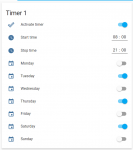
I'm trying to make HA timer for mower. What happen if mower receive start command again when allready mowing, like every 5 minutes or so?
timer.png
 
Cool (y)
I am interrested in this kind of feature also for my sprinkler(y)
Do not hesitate to share the yaml
It's not OK with start while mowing

But you can use the Mqtt value status and send start only if status is IN STATION and same to send the home only if status is NORMAL MOWING or SPIRALE_MOWING
list of status:
{ WAIT,NORMAL_MOWING,SPIRALE_MOWING,BACK_TO_STATION, TRACK_TO_START, MANUAL, REMOTE, IN_ERROR, IN_STATION, TESTING,WAITSIG2,WIRE_MOWING };

It's also possible to do this into PFOD
Code:
} else if (pfodCmd == "ra") {
    robot->mowPatternDuration = 0;
    robot->motorMowEnable = true;
replace by
Code:
} else if ((pfodCmd == "ra") && (robot->statusCurr == IN_STATION) {
    robot->mowPatternDuration = 0;
    robot->motorMowEnable = true;


Today the mower stay into station with Mqtt activate without any freeze with Piardu 318 and new config.py and video Stream all time.
 
I'll use status as condition in automation trigger, that will work. Only reliable way is trigger every minute and check conditions. If it triggers only start time that won't work.. Start command and mow pattern can be send only separate messages?
 
Hello
I found that there is an Adapter aviable for lovelace in iobroker.
But first I need the chance to send something to mower over mqtt.
Do you see a chance to publish in Piardu the command topic?
Best regards,
Bjoern
 
Do you see a chance to publish in Piardu the command topic?
I need to check if it can work on IOBROKER maybe JUSSIP know ?
Start command and mow pattern can be send only separate messages?
When i test with Qos=1 i see sometime this Strange behaviour :
I send message 1 and 1 seconde later message 2
But i receive the callback for message 2 before message 1
So maybe it's better to send all in the same message to avoid the mower receive the start message before the variable.

I need this variable to start with the timer:
mowPatternCurr -->1,2 or 3 {MOW_RANDOM, MOW_LANES,MOW_WIRE, MOW_ZIGZAG}
laneUseNr = 1; --> 1,2 or 3 it's the heading on MOW_LANES
rollDir = 1; --> 0 or 1 first roll when start bylane (left or right)
wheretoStart = 1 --> integer : distance to drive on the wire in meter before start
areaToGo --> integer : area 1 or 2
actualLenghtByLane --> integer : max lane lenght in mowing by lane in meter

Actualy when you send the payload START alone , the mower leave station drive 1 meter on wire and start with the last mowpattern.

It's possible to add a new paylod STARTTIMER for example with ; split
Example:
STARTTIMER;2;3;1;28;1;36
mean start with mowlane,heading 3,first roll right,at 28 meter from station,into area1,with 36 meter lane
STARTTIMER;1;3;1;50;2;36
mean start with mowrandom,heading is not use,first roll right,at 50 meter from entry into area,into area2,with 36 meter lane(not use in random mow)
By this way the HASSIO timer can totaly replace the Arduremote one.

tell me what is possible to manage in HASSIO and lovelace and i can easily update the pyardu and RpiRemote to make this work.
 
I'm not fully follow what stockfisch means? command topic is 'Mower/COMMAND/' and payloads for now is 'START', 'STOP', 'HOME', 'MOWPATTERN' and 'PAUSE'. Mower/OCMMAND/VIDEO/ 'ON' and 'OFF' for stream
Starttimer payloads is way to go (y) same format for all options is easiest. 'STARTTIMER;1;2;3;4;5;6'
 
I start to work with Mqtt 2 or 3 weeks ago with stockfisch using IOBROKER and i see the same result ,I can't find a way to send over mqtt ??.
IOBROKER receive correctly the sensor value but sending ?????
Also all the Iobroker tuto or help on the net are write in German and i can't understand.
It's possible that i need to write a python script to send all the possible payload into config sentence for Auto Discovery, but it's complex and not sure it work.
I prefer to first make new test with Tasmota Discovery process and IOBROKER to be sure the Discovery process can work.
 
Hello
Today i tested 318 ...
For me the same result. I can not send.
But i tested also with Software MQTT.fx
Also with this tool i can not send the right command to work with Piardu.
I tried also to activate Cam and waited for your answer in console like: consoleInsertText("Start Video streaming" + '\n')
But in Console i see only: Topic : Mower/COMMAND/VIDEO/ Data : b'ON\n\n\n'
I have a question. I have 5 datapoints that where sended by 318.
For me it looks like:
Mower/Temp 22
Mower/Battery 29
Mower/State OFF
Mower/Idle 17652
Mower/Status Wait
And for sending i need:
Mower/COMMAND START,STOP,HOME
Mower/COMMAND/VIDEO ON,OFF
Perhaps this is the problem: I have to use COMMAND as a topic and i have to use COMMAND as a folder.
Sorry, i am confused.
Thank you both for your time.
Best
Bjoern
 
Hi.
I Have tested also from IOBROKER but like 3 weeks ago i Don't understand how to send simple message
I keep the SD card so i can test again later

For topic and payload:
into Mower/Temp 22
Mower/Temp is topic
22 is payload

Into Mower/COMMAND START
Mower/COMMAND is topic
START is payload

Maybe Paho handle an exception and the prog Don't stop
You can try this into Pyardu318 to be sure the Paho Don't capture error.

Line 141 comment
#consoleInsertText("MQTT send message " + var_topic + " " + var_payload + '\n')
For a simple view in console.

Line 100 uncomment Mqqt_client.on_log = Mqqt_on_log
#the on_log and on_publish show debug message in terminal
Mqqt_client.on_log = Mqqt_on_log
#Mqqt_client.on_publish = Mqqt_on_publish
You can now see all the incomming data into Terminal(Python Schell)
And check that there is no callback error or exception in the terminal

See Terminal and console attached for 2 click on stop and start / stop video from home assistant.
I join also a simple python mqtt test prog to publish to mower to be sure it's OK.Into ZIP because fail with extension .py)
 

Anhänge

  • schell.txt
    2,6 KB · Aufrufe: 8
  • 202005122052_Console.txt
    1 KB · Aufrufe: 1
  • publish.zip
    543 Bytes · Aufrufe: 1
Hello
Thanks for Logs. That helped.
I found 2 points.

1. For iobroker there is the last / to much.
For me this one is working:
if(str(message.topic)=="Mower/COMMAND/VIDEO"):
This one (original) is not working:
if(str(message.topic)=="Mower/COMMAND/VIDEO/"):

2. For iobroker i need a different topic for the command problem.
This one (original) is not workingl:
Mower/COMMAND/
Also this one is not working:
Mower/COMMAND
This one with subfolder is working:
Mower/COMMAND/SEND

So the main problems seems to be the / and the subfolder.
That means for me, i have to modify every update comming from you :-(
Enclosed you will find a screenshot with working iobroker topics.
Best regards,
Bjoern
 

Anhänge

  • IObroker.JPG
    IObroker.JPG
    42,2 KB · Aufrufe: 12
Oben