Du verwendest einen veralteten Browser. Es ist möglich, dass diese oder andere Websites nicht korrekt angezeigt werden.
Du solltest ein Upgrade durchführen oder einen alternativen Browser verwenden.
Du solltest ein Upgrade durchführen oder einen alternativen Browser verwenden.
Arctic Hare mod by Jussi
- Ersteller jussip
- Erstellt am
Yes no problem with PC or laptop or tactile PI screen but only problem with tactile remote device like Tablet or phone and VNC Viewer or other SSH device (The tactile parts is never forward, only the mouse)
It's difficult to explain ,Make the test with a mobile phone and VNC and you can see what i mean.
I use this eBay device for mouse and keyboard to control the PI and remote the mower (In manual Menu left bottom) but the problem is not that.
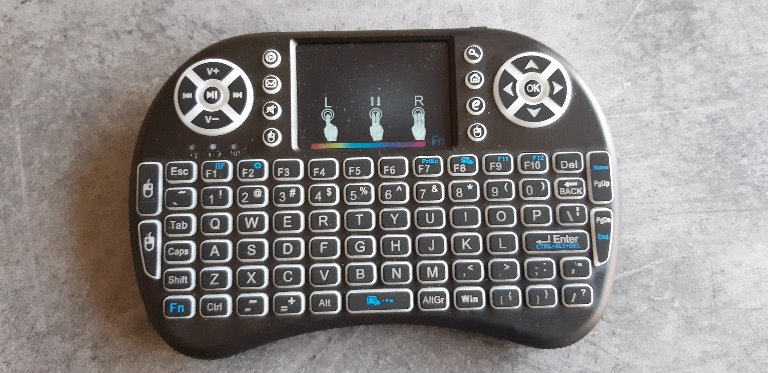
Attachment: https://forum.ardumower.de/data/media/kunena/attachments/3545/remote.jpg/
It's difficult to explain ,Make the test with a mobile phone and VNC and you can see what i mean.
I use this eBay device for mouse and keyboard to control the PI and remote the mower (In manual Menu left bottom) but the problem is not that.
Attachment: https://forum.ardumower.de/data/media/kunena/attachments/3545/remote.jpg/

Zuletzt bearbeitet von einem Moderator:
Tested realVNC today with samsung s7, it's not perfect but works. I didn't figure out what's the problem 
If setting timer with start e.g. 40 m. Then hit button 'test setting' Mower try to leave station but it's not reverse enough and hit to shelter. Is this reverse setting somewhere else than under 'station' -menu?
Mower shelter has two walls and it's against house wall, perim. wire goes now trough back wall. Is it better to change wire like dotted line in picture? No problems so far but now when trying to get working timer with start distance it might be a problem?

Attachment: https://forum.ardumower.de/data/media/kunena/attachments/4741/perimw.jpg/
If setting timer with start e.g. 40 m. Then hit button 'test setting' Mower try to leave station but it's not reverse enough and hit to shelter. Is this reverse setting somewhere else than under 'station' -menu?
Mower shelter has two walls and it's against house wall, perim. wire goes now trough back wall. Is it better to change wire like dotted line in picture? No problems so far but now when trying to get working timer with start distance it might be a problem?
Attachment: https://forum.ardumower.de/data/media/kunena/attachments/4741/perimw.jpg/

Zuletzt bearbeitet von einem Moderator:
Yes it work with phone but i need to drive the mouse arrow before click.
If I click on phone on back for example and the arrow is on home ????
For the start by timer ,to test simply send the mower to station and go into timer setting page set set start time before now and use no and yes to reset the 1 hour pause on go home the mower need to start in the next minute.
For the wall it is depend on the driving direction but the bumper stop and avoid the obstacle
If I click on phone on back for example and the arrow is on home ????
For the start by timer ,to test simply send the mower to station and go into timer setting page set set start time before now and use no and yes to reset the 1 hour pause on go home the mower need to start in the next minute.
For the wall it is depend on the driving direction but the bumper stop and avoid the obstacle
Yes it work with phone but i need to drive the mouse arrow before click.
If I click on phone on back for example and the arrow is on home ????
For the start by timer ,to test simply send the mower to station and go into timer setting page set set start time before now and use no and yes to reset the 1 hour pause on go home the mower need to start in the next minute.
For the wall it is depend on the driving direction but the bumper stop and avoid the obstacle
If I click on phone on back for example and the arrow is on home ????
For the start by timer ,to test simply send the mower to station and go into timer setting page set set start time before now and use no and yes to reset the 1 hour pause on go home the mower need to start in the next minute.
For the wall it is depend on the driving direction but the bumper stop and avoid the obstacle
Yes it work with phone but i need to drive the mouse arrow before click.
If I click on phone on back for example and the arrow is on home ????
For the start by timer ,to test simply send the mower to station and go into timer setting page set set start time before now and use no and yes to reset the 1 hour pause on go home the mower need to start in the next minute.
For the wall it is depend on the driving direction but the bumper stop and avoid the obstacle
If I click on phone on back for example and the arrow is on home ????
For the start by timer ,to test simply send the mower to station and go into timer setting page set set start time before now and use no and yes to reset the 1 hour pause on go home the mower need to start in the next minute.
For the wall it is depend on the driving direction but the bumper stop and avoid the obstacle
Driving mouse is stupid.. Some x-servers has tablet-mode, maybe that could help.
Timer triggers and mower reverse, turn 45 deg and mower goes straight to other side and start tracking (but that's wrong direction, I need at least one turn more or arc back to right side wire) Does distance count start same time with tracking?
Timer triggers and mower reverse, turn 45 deg and mower goes straight to other side and start tracking (but that's wrong direction, I need at least one turn more or arc back to right side wire) Does distance count start same time with tracking?
I am at home so here how it's work:
into timer.h
trigger start the state "STATE_STATION_REV"
Add ":" after "STATE_STATION_REV" and seach using Ctrl F --> "STATE_STATION_REV:" into robot.cpp.
You need to find 2 occurences
The first one line 2676 is the initial setting of the state and is execute only one time and set the speed , odometry etc.… for the state
The second line 5707 is inside the loop and is execute non stop (near one time each millisecond)
In the first one (the initial setting you can see that the speed of the 2 motors are the same and negative so it's reverse straight.
the stateEndOdometryRight = odometryRight - (odometryTicksPerCm * stationRevDist); set the reverse distance according to the stationrevdist (set using PFOD into setting station)
Now in the second occurence the code check non stop the odometry it's
if ((odometryRight
into timer.h
trigger start the state "STATE_STATION_REV"
Add ":" after "STATE_STATION_REV" and seach using Ctrl F --> "STATE_STATION_REV:" into robot.cpp.
You need to find 2 occurences
The first one line 2676 is the initial setting of the state and is execute only one time and set the speed , odometry etc.… for the state
The second line 5707 is inside the loop and is execute non stop (near one time each millisecond)
In the first one (the initial setting you can see that the speed of the 2 motors are the same and negative so it's reverse straight.
the stateEndOdometryRight = odometryRight - (odometryTicksPerCm * stationRevDist); set the reverse distance according to the stationrevdist (set using PFOD into setting station)
Now in the second occurence the code check non stop the odometry it's
if ((odometryRight
Thanks again, I pretty much understand those part allready. Maybe picture will tell better what I try to do. Starting with timer and go to bigger lawn but it does not happen if tracking start on wrong side wire
If looked right on pfodd after state_station_forward comes pfnd when started via timer with xx m tracking included?
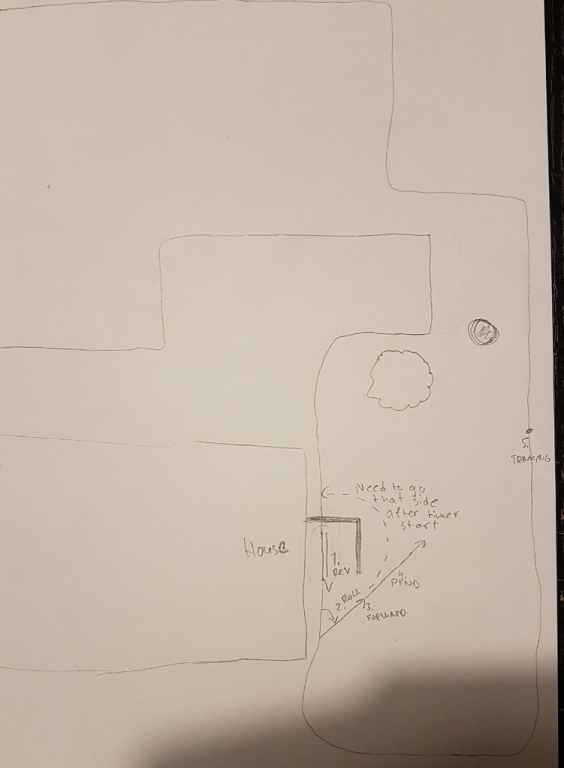
Attachment: https://forum.ardumower.de/data/media/kunena/attachments/4741/timerstart_2019-06-29.jpg/
If looked right on pfodd after state_station_forward comes pfnd when started via timer with xx m tracking included?
Attachment: https://forum.ardumower.de/data/media/kunena/attachments/4741/timerstart_2019-06-29.jpg/

Zuletzt bearbeitet von einem Moderator:
After State station forward you need to have STATE_PERI_OBSTACLE_AVOID check if the start distance is not 0 into your timer setting ?.
whereToStart or startByTimer are certainly not OK but Why?
Are you also sure that Rain,Timer or Battery trigger Don't send again the mower to station ?
To be sure remove the test
And show me the Pi Console ?
I don't remember if i change something in this parts of the code but normaly it's works exactly like you want
Here the video with same station position
https://www.youtube.com/watch?v=2HWGd7ELcBg&list=UUIMdsOWo0cHTKruv9PVdJPw&index=26
whereToStart or startByTimer are certainly not OK but Why?
Are you also sure that Rain,Timer or Battery trigger Don't send again the mower to station ?
To be sure remove the test
Code:
if ((whereToStart != 0) && (startByTimer)) { //if ((whereToStart != 0) make a circle arround the station if not start immediatly
          setNextState(STATE_PERI_OBSTACLE_AVOID, rollDir);
        }
And show me the Pi Console ?
I don't remember if i change something in this parts of the code but normaly it's works exactly like you want
Here the video with same station position
https://www.youtube.com/watch?v=2HWGd7ELcBg&list=UUIMdsOWo0cHTKruv9PVdJPw&index=26
Here is console output from piardu, left motor warnings came out because mower reverse slightly on wall.
Now it started arc but only few seconds after pfnd
I need to do compelete eeprom erase. How to do that? wipe it complete empty. I have few settings that don't store properly -> after reboot those are changed back old values
Now it started arc but only few seconds after pfnd
I need to do compelete eeprom erase. How to do that? wipe it complete empty. I have few settings that don't store properly -> after reboot those are changed back old values
Code:
12:11:37 Status WAIT New State OFF  Dir 0 State changed at 267428 From state PFND
12:11:37 Robot Stats address Stop = 826
12:11:37 Robot Stats address Start = 800
12:11:37 Save Robot Stats
12:11:23 Status TRACKTOSTART New State PFND Dir 0 State changed at 253073 From state POBSCIRC
12:11:20 Status TRACKTOSTART New State POBSCIRC Dir 1 State changed at 250335 From state STFOR
12:11:18 Status TRACKTOSTART New State STFOR Dir 1 State changed at 248292 From state STROL
12:11:17 WARNING PROTECTION ON LEFT MOTOR   motorLeftPWMCurr=-1  pwmLeft=95  On state STROL
12:11:17 WARNING PROTECTION ON LEFT MOTOR   motorLeftPWMCurr=-2  pwmLeft=95  On state STROL
12:11:17 WARNING PROTECTION ON LEFT MOTOR   motorLeftPWMCurr=-3  pwmLeft=95  On state STROL
12:11:17 WARNING PROTECTION ON LEFT MOTOR   motorLeftPWMCurr=-4  pwmLeft=95  On state STROL
12:11:17 WARNING PROTECTION ON LEFT MOTOR   motorLeftPWMCurr=-5  pwmLeft=95  On state STROL
12:11:17 WARNING PROTECTION ON LEFT MOTOR   motorLeftPWMCurr=-6  pwmLeft=95  On state STROL
12:11:17 WARNING PROTECTION ON LEFT MOTOR   motorLeftPWMCurr=-7  pwmLeft=95  On state STROL
12:11:17 WARNING PROTECTION ON LEFT MOTOR   motorLeftPWMCurr=-8  pwmLeft=95  On state STROL
12:11:16 WARNING PROTECTION ON LEFT MOTOR   motorLeftPWMCurr=-9  pwmLeft=95  On state STROL
12:11:16 WARNING PROTECTION ON LEFT MOTOR   motorLeftPWMCurr=-10  pwmLeft=95  On state STROL
12:11:16 WARNING PROTECTION ON LEFT MOTOR   motorLeftPWMCurr=-12  pwmLeft=95  On state STROL
12:11:16 WARNING PROTECTION ON LEFT MOTOR   motorLeftPWMCurr=-14  pwmLeft=95  On state STROL
12:11:16 WARNING PROTECTION ON LEFT MOTOR   motorLeftPWMCurr=-16  pwmLeft=95  On state STROL
12:11:16 WARNING PROTECTION ON LEFT MOTOR   motorLeftPWMCurr=-18  pwmLeft=95  On state STROL
12:11:16 WARNING PROTECTION ON LEFT MOTOR   motorLeftPWMCurr=-20  pwmLeft=95  On state STROL
12:11:16 WARNING PROTECTION ON LEFT MOTOR   motorLeftPWMCurr=-22  pwmLeft=95  On state STROL
12:11:16 WARNING PROTECTION ON LEFT MOTOR   motorLeftPWMCurr=-24  pwmLeft=95  On state STROL
12:11:16 WARNING PROTECTION ON LEFT MOTOR   motorLeftPWMCurr=-27  pwmLeft=95  On state STROL
12:11:16 WARNING PROTECTION ON LEFT MOTOR   motorLeftPWMCurr=-30  pwmLeft=95  On state STROL
12:11:16 WARNING PROTECTION ON LEFT MOTOR   motorLeftPWMCurr=-33  pwmLeft=94  On state STROL
12:11:16 WARNING PROTECTION ON LEFT MOTOR   motorLeftPWMCurr=-36  pwmLeft=92  On state STROL
12:11:16 WARNING PROTECTION ON LEFT MOTOR   motorLeftPWMCurr=-39  pwmLeft=89  On state STROL
12:11:16 WARNING PROTECTION ON LEFT MOTOR   motorLeftPWMCurr=-43  pwmLeft=85  On state STROL
12:11:16 WARNING PROTECTION ON LEFT MOTOR   motorLeftPWMCurr=-47  pwmLeft=79  On state STROL
12:11:16 WARNING PROTECTION ON LEFT MOTOR   motorLeftPWMCurr=-51  pwmLeft=72  On state STROL
12:11:16 WARNING PROTECTION ON LEFT MOTOR   motorLeftPWMCurr=-56  pwmLeft=64  On state STROL
12:11:16 WARNING PROTECTION ON LEFT MOTOR   motorLeftPWMCurr=-61  pwmLeft=55  On state STROL
12:11:16 WARNING PROTECTION ON LEFT MOTOR   motorLeftPWMCurr=-66  pwmLeft=50  On state STROL
12:11:16 WARNING PROTECTION ON LEFT MOTOR   motorLeftPWMCurr=-72  pwmLeft=50  On state STROL
12:11:16 WARNING PROTECTION ON LEFT MOTOR   motorLeftPWMCurr=-78  pwmLeft=50  On state STROL
12:11:16 WARNING PROTECTION ON LEFT MOTOR   motorLeftPWMCurr=-85  pwmLeft=50  On state STROL
12:11:16 WARNING PROTECTION ON LEFT MOTOR   motorLeftPWMCurr=-92  pwmLeft=50  On state STROL
12:11:16 Status TRACKTOSTART New State STROL Dir 1 State changed at 245784 From state STREV
12:11:16 Warning can t make the station rev in time
12:11:11 Status TRACKTOSTART New State STREV Dir 0 State changed at 240969 From state STAT
12:11:11 Timer 0 timer start triggered
12:11:11 Timer 0 startmin 360 stopmin 1320 currmin 732
12:11:11 checktimerJust added RFID parts, is there something else changed? robot.cpp, robot.h, mower.cpp, mower.h, pfodd.cpp. pfod.h, rpiremote.cpp, rpiremote.h and gps.cpp is updated from rfid branch
gps use, station check distance and station forward distance changes back, maybe there are others too..
gps use, station check distance and station forward distance changes back, maybe there are others too..
First Try the factory setting and check the last value of the eereadwrite list (If it's saved when poweroff All is OK ,if no ?????????)
I use in my mower the rfid branch but the rfid is based on master so maybe check also the master change.
I use Arduino ide to flash the DUE using programming port.
I need to remove option to flash from the PI ,Because when i develop it the JP8 was ON and all was working ,but if JP8 if Autom "and it's necessary" ,
when the Pi upload the code into the DUE the PCB1.3 shutdown and the PI also so it can't only work if you keep power on the DUE with programming port and so it's better to directly flash using programming port.
I use in my mower the rfid branch but the rfid is based on master so maybe check also the master change.
I use Arduino ide to flash the DUE using programming port.
I need to remove option to flash from the PI ,Because when i develop it the JP8 was ON and all was working ,but if JP8 if Autom "and it's necessary" ,
when the Pi upload the code into the DUE the PCB1.3 shutdown and the PI also so it can't only work if you keep power on the DUE with programming port and so it's better to directly flash using programming port.