Arctic Hare mod by Jussi

Hi.
First the Gps is not accurate at all and not really use in the soft but you can check this by your own using Gpsprune .
What GPS did you use M6 or M8. the actual code is for M8 but: it's easy to change if i can remember (GNRMC is same as GPRMC)
Here a GPS connected on PCB1.3, But Roland and other have trouble with it (Work Ok for me on 2 boards ???)
[attachment=6038]20180725_171519.jpg[/attachment]


If GPS is connected on PI Better for you if you Don't use the screen
Into config.py you need to set GpsConnectedOnPi=True in the Linux platform part.
And deactivate it on the PCB1.3 with Arduremote on the setting Gps

On startup the PyArdu start Gpsrecord.py in background to create a file that you can read later
You can test only this prog with idle3 (Python3 idle) into SSH session
If you use M6 from shop :
Check the serial port at the beginning of Gpsrecord.py
and change:
if "$GNRMC" in line: # This will exclude other NMEA sentences t
by
if "$GPRMC" in line: # This will exclude other NMEA sentences t

If it's OK the file is write on /gpsdata/ folder.

Wait at least 5 minute until a fix.


If GPS connected on PCB.
Into config.py you need to set GpsConnectedOnPi=False in the Linux platform part.
And activate it on the PCB1.3 with Arduremote on the setting Gps
REBOOT PCB1.3

On PyArdu startup, Go in the GPS screen and set it to start
If it's OK On the Console you need to see the GPRMC sentence comming .
Again wait 5 min until a Fix.

The same file is generate.

The light soft GPSPRUNE can read the file and show you the BAD data.
 
Setting "use gps" via pfodapp it is opposite than via piardumower. If pfodapp says yes, theres no tick on piardumower. If I put tick there pfodapp says no :D This gps don't want to cooperate with me :D :D its neo-6m
 
The GPS is not use by Azuritber actualy.
If you connect the GPS on the raspberry pi serial (on the gpio port) you need to set the gps no into azurit and true in the config of the raspberry.
If you connect the GPS on the PCB 1.3 it is the opposite.

For me the accuracy is not ok at all to control something
Put the mower on off for 30 minutes, record all and check with gpsprune,certainly you discover something like 10 meter circle, so it is not possible to detect a correct stuck by this sensor..
I thing roland use it in raindancer to help on mowing area, but i don t remember exactly how it work
I check this weekend for the neo 6m but normaly it s work ( maybe need to change the init process)
 
Setting "use gps" via pfodapp it is opposite than via piardumower. If pfodapp says yes, theres no tick on piardumower. If I put tick there pfodapp says no This gps don't want to cooperate with me its neo-6m
.
I Don't understand.
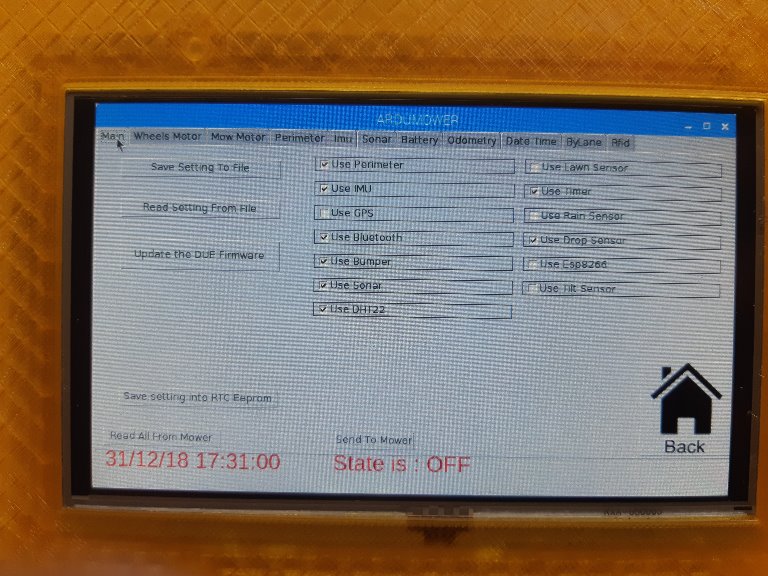
settingmain_2019-05-02.jpg

On Pi side if you tick the Gps and don't forget to click on Send to mower, normaly the Pfod value need to change ??
And same if you change something using Pfod you need to click on read All From Mower to view the tick.
Don't forget to use the Save setting into RTC EEprom.


Also in the raspberry the file Gpsrecord.py use a serial port for PI ZERO, maybee change it withTTYAMA0
Attachment: https://forum.ardumower.de/data/media/kunena/attachments/3545/settingmain_2019-05-02.jpg/
 
Zuletzt bearbeitet von einem Moderator:
You can read all this topic and use the test code
https://www.ardumower.de/index.php/de/forum/navigation-gps-odmetrie/1737-wait-for-gps-position-data#16054
 
Probably I forgot to save settings. Nothing wrong with that setting anymore :)
Maybe its better to toss gps and do something else
 
Yes it's normal you can t use this gyro with my code .
Only GY88 ( Carreful GY87 can't work on PCB1.3 normal i2c because adress is same as RTC) have the correct accuracy for by lane mowing and remote drive on rfid or perimeter find.
Maybe it is possible to add mpu6050 and use the hmc8883 from GY801 but not sure I need to check this .
 
Found one from ebay, should I buy it :D https://www.*bay.com/itm/GY-88-Modu...211481?hash=item25d6a954d9:g:Br0AAOSw8lpZF8hF
Is this sender code right? It shows almost all the time 1.1 only when not charging but mower is in station reading is about 0.4A

Code:
chargeCurrentMeasurements.getAverage(v);        
      chargeCurrent = ((double)(((int)v)  - ((int)chargeADCZero))) / 1023.0 * 1.1;


Mower current code:

Code:
double curramp = batSenseFactor * readSensor(SEN_CHG_CURRENT) * 3.3 / 4096 ;
 
The price is very funny Maybe you receive 1000 IMU.

I check if it's possible to use GY87 (from shop) on the second I2c bus of the Due or if you can Simply add a MPU-6050 (from shop).

For the sender I never check the original code because it work perfectly:

Wire is cut the Led is OFF.
Wire OK and sender send the data LED is ON and the value are same as in the WIKI.
Mower in station Led is blinking and sender is stop

I Don't know why the 1.1 and the main is that the mower is detected everytime and the sender is stop.


For the charge:
I Don't know if it's a good practice but i never use the charge current to stop charging,i Always use the timeOut at 4 or 5Hours.
The charger is 29.2V ,4Ah
In the mower it's 2 packs (24V , 4.4Ah)

Current change for me from 2.7Amp to 0.5Amp after 5 Hours of charging
and the final voltage is near 28.8V
 
Is it possible to trigger sensor via raspberry? I have weather station and I'm thinking using it's data to rain detecting. One option is wires from gpio pins to due rain sensor pins but if it can be done via software?

My battery is 10,5 Ah and 3 A charger, it takes about 5 hours from empty to full. I have now 0,35 A current limit (this point theres 29,2v bat voltage) and 6 hour time limit. In theory it should be faster but CV-mode takes time 1,5-2 hours.
 
Hi.
I don't know exactly your knowledge in python and arduino Ide but the rain detect is already exchange between Pi and DUE by sending the return to home in Pfod format.
For simple command i use the pfod format :
Into PyArdu.py

Code:
if (message.rain == 1):
                    mower.rainDetect=True
                    consoleInsertText('RAIN DETECTED TIME TO GO TO STATION'+ 'n')
                    button_home_click()
                    
                else:
                    mower.rainDetect=False


And the button_home_click() send the 'rh' to Pfod (search into pfod.cpp "rh")


Code:
def button_home_click():
    send_pfo_message('rh','1','2','3','4','5','6',)


For other or more complex
It's also possible to change all the variable you want into AZURIT from the raspberry using a simple command:
For example here i change the maxspeed before send the pfod 'nf' (manual forward)
Into Pi

Code:
def ButtonForward_click():
    ButtonReverse.configure(state='disabled')
    send_var_message('w','motorSpeedMaxPwm',''+str(manualSpeedSlider.get())+'','0','0','0','0','0','0','0')
    send_pfo_message('nf','1','2','3','4','5','6',)


Into Azuritber in RpiRemote.cpp
line 1110


Code:
if (strncmp(variable_name[i], "motorSpeedMaxPwm", 20) == 0)  robot->motorSpeedMaxPwm = atoi(received_value[i]);


here you can add all the variable you want and send it with the Pi code.


How the Raspberry read the Data from your weather station ??


Can you tell me where you order your 18650 Accu and the BMS,I have to build another 24V 8Ah battery and maybe need your help.
 
I have done programming mainly with arduino and c++. I'm using linux so also bash coding is familiar. Home automation stuff etc. Nothing really with python but this is great learning project
Weather station can report data many ways but maybe http-request is easiest way to go. e.g. 'curl http://ip_address/last60m_rain0_total_mm' returns last 60 minutes amount of rain. If that is not zero then its raining or has been raining during last 60 minutes. e.g. right now there comes reading '0.60' but 'curl http://ip_address/actual_rain0_total_mm' returns '0.00' so rain has been within an hour but not right this moment.

Does that command 'motorSpeedMaxPwm' write variable to eeprom or just memory?

I bought 18650's domestic from akkula.fi, those are samsung 35E 3500mAh cells. BMS is from china, search ebay '7S 24V 20A Lithium 18650 Battery BMS Protection Board Charging Controller TE992'
Don't buy other than good brand cells, samsung, panasonic, sony, LG etc.
 
Does that command 'motorSpeedMaxPwm' write variable to eeprom or just memory?
Just on memory The eeprom is only use when save user setting.

I Don't remember the version i send to you but i use this to communicate with the sender area2 and it's easy to use
Certainly you can find it in the PyArdu.py
The Pi send the data locate into file startarea2.txt at ip adress 192.168.1.199 and wait for the response. it's same as (http://192.168.1.199/area2/1)
So it's same as your weather Station.

Code:
def ButtonStartArea2_click():
    sub = subprocess.Popen("nc 192.168.1.199 80 <startarea2.txt", stdout=subprocess.PIPE, stderr=subprocess.PIPE,shell=True)
    output, error_output = sub.communicate()
    if str(output)=="b'SENDER IS ON'":
        mymower.sigArea2Off=False
        consoleInsertText("Area2 Sender is Running" + 'n')    
    else:
        mymower.sigArea2Off=True
        consoleInsertText("*********** Area2 Sender FAIL To Start ************" + 'n')     
    
    if str(error_output)!="b''":
        print ('ERROR:')
        print (error_output)
        consoleInsertText(error_output+ 'n')    
    send_var_message('w','areaInMowing','2','0','0','0','0','0','0','0')


Thanks for the battery,I use Sony or Samsumg from TME electronic but i always use 2300mah with Denna protector board.
Did a protector board for 2300mah can manage 3500mah battery ??
 
Battery capacity can be changed, charging/discharging current remains same. Protection board monitor voltage and current. It has usually at least these functions: over-current/short cicrcuit (charging and discharging), over-voltage (charging), under-voltage (discharging) and balancing (charging)
 
Code:
def readWS():
	
	print("reading ws rain sensor")
	rainWS = subprocess.Popen("curl [URL]http://192.168.1.1/meteograph.cgi?text=last60m_rain0_total_mm",[/URL] stdout=subprocess.PIPE, stderr=subprocess.PIPE,shell=True)
    if str(rainWS)!="0.00":
	print("rain detected")
        consoleInsertText("RAIN DETECTED" + 'n')   
	send_pfo_message('rh','1','2','3','4','5','6',)	# Go home
	#send_var_message('w','areaInMowing','2','0','0','0','0','0','0','0')
    else:
       	print("no rain")
        consoleInsertText("NO RAIN DETECTED" + 'n')


Does it work if writing mower 'SEN_RAIN' to 1? Above code does nothing, something missing :)
 
First to dev on the PI.
VNC is possible but not very easy.
I use MobaXterm free version /Create SSH session(upper left icon) with the Pi adress IP
When the session is started ,Type Idle3 on commend line , a new Windows is coming,click on file Open PyArdu.py and edit the Code,,start using F5 to have The GUI and terminal where you can see all the print().

So.
First into PC Chrome or Explorer: http://192.168.1.1/meteograph.cgi?text=last60m_rain0_total_mm need to return Something with your PC and with the Pi explorer.

After in Python:
You need to test the return of sub.communicate
Maybe Something like that.


Code:
rainWS = subprocess.Popen("curl [URL]http://192.168.1.1/meteograph.cgi?text=last60m_rain0_total_mm",[/URL] stdout=subprocess.PIPE, stderr=subprocess.PIPE,shell=True)
output, error_output = sub.communicate()
print(output)
print(error_output)
if str(output)=="b'0.00'":

So first look at the terminal of idle to see if the output is comming from the Weather station and check the return value
I never test if curl is OK for the PI,So please confirm
If Nothing on output:
You can create a weather.txt file with (/meteograph.cgi?text=last60m_rain0_total_mm) Inside and send it using nc like in my code with /area2/1
sub = subprocess.Popen("nc 192.168.1.1 80
 
It was function and I didn't call it. Working now but it need to be run in loop right?
I use new variable and use that in robot.cpp

Code:
if ((rainUse) && (millis() >= nextTimeRain)) {
    // read rain sensor
    nextTimeRain = millis() + 5000;
    rain = ((readSensor(SEN_RAIN) != 0) || (rainWS != 0));
    if (rain) rainCounter++;
  }


Code:
def readWS():
    wsrain = subprocess.Popen("curl [URL]http://192.168.1.11/meteograph.cgi?text=last60m_rain0_total_mm",[/URL] stdout=subprocess.PIPE, stderr=subprocess.PIPE,shell=True)
    if str(wsrain)!="0.00":
        mower.rainWS=True
        print("rain detected")
        consoleInsertText("RAIN DETECTED" + 'n')
        send_var_message('w','rainWS','1','0','0','0','0','0','0','0')

    else:
        mower.rainWS=False
        print("no rain")
        send_var_message('w','rainWS','0','0','0','0','0','0','0','0')
 
Oben