Arctic Hare mod by Jussi

Did you remove 'motorForwTimeMax' setting?
No.
Perimeter transmitter turned off (led was blinking)
I never see this behaviour.
If you are using the sender shop code,Are you sure the mower is detected when it is Inside the station (Led station need to blink and 6 hours timeout is reset)
It's strange that your issue is Always in relation with the charging process ???
ARE you really sure that the charging contact is OK (Aluminium part ?)
 
Yes i use the same esp32 with same PCB as the RFID reader.
I can create a new thread with the description if you want to build one.
With the Wifi it's possible to simplify a lot and maybe remove the reading sense INA3221 parts so need only Screen,ESP32,DC/DC and L298N driver, so very cheap parts.
See code

The Charging station one detect the mower with current sensor INA3221 and stop signal only if mower is into station.
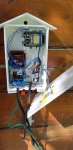
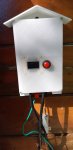
Here the picture of harging station20200520_174240.jpg20200520_174226.jpg20200520_174418.jpg
 
Looks nice (y) I'm thinking just replacing nano with esp32

Weird things happened today, mower was middle of wife's flowerbed mowing tulips and tried to reverse trough white cedar fence etc.. :rolleyes: rtc, eeprom errors, perimeter signal was lost (transmitter was on)
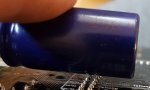
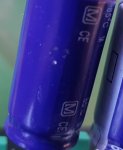
I dissembled pcb and fault found, I think.. c10 insulation is broken and it was in in contact with due pin's
 

Anhänge

  • 2020-05-20 20.11.39.jpg
    2020-05-20 20.11.39.jpg
    500,1 KB · Aufrufe: 19
  • 2020-05-20 20.10.57.jpg
    2020-05-20 20.10.57.jpg
    425,8 KB · Aufrufe: 16
Zuletzt bearbeitet:
Watchdog disabled mower still reboot few secs after state charging..
Code:
11:57:12 All Console file are saved
11:57:12 RTC data error!
11:57:12 DS1307 comm error
11:57:12 Watchdog is disabled
11:57:12 off
11:57:12   v to change console output (sensor counters, values, perimeter etc.)
11:57:12   d for menu
11:57:12 press...
11:57:12 Config: ArduMower
11:57:12 Ardumower 1.2-Azurit-ber
11:57:12 START
11:57:12 capture size=192
11:57:12 subSample=4
11:57:12 matchSignal size=24
11:57:12 New sigcode in use  : 1,1,-1,-1,1,-1,1,-1,-1,1,-1,1,1,-1,-1,1,-1,-1,1,-1,-1,1,1,-1,
11:57:12 Change to Area : 1
11:57:12 --------------------------------- IMU READY ------------------------------
11:57:12 AccelGyro Yaw: 0.00  Compass Yaw: 0.00  Diff between compass and accelGyro in Radian and Deg0.00 / 0.00
11:57:09 Wait 3 secondes to stabilize the Drift
11:57:09 DMP Initialization failed
11:57:06 Initializing DMP...
11:57:06 MPU6050 connection failed
11:57:03 comScale=2.00,2.00,2.00
11:57:03 COMPASS OFFSET X.Y.Z AND SCALE X.Y.Z   --> comOfs=0.00,0.00,0.00
11:57:03 ACCEL GYRO MPU6050 OFFSET ax: 376 ay: -1768 az: 1512 gx: 91 gy: 12 gz: -2
11:57:03 -------- IMU CALIBRATION  --------
11:57:03 IMU error: no calib data
11:57:02 COMPASS HMC5883L FAIL
11:57:02 COMPASS HMC5883L ID NEED TO BE 72 IF ALL IS OK ------>  ID=0
11:57:02 --------------------------------- IMU INITIALISATION -------------------
11:57:02 Robot Stats address Stop = 826
11:57:02 Robot Stats address Start = 800
11:57:00 PLEASE CHECK IF YOUR ROBOT STATS ARE CORRECT
11:56:38 roll change 20 deg in less than 50 ms ????????? value is skip
11:56:38 Last roll : 0.92 Actual roll : -44.12
11:56:38 pitch change 20 deg in less than 50 ms ????????? value is skip
11:56:38 Last pitch : 3.37 Actual pitch : -41.56
11:56:37 STATION / CHARG
11:56:13 No rain in last 60 minutes
11:56:12 STATION / STAT
11:56:11 Watchdog is disabled
11:56:11 off
11:56:11   v to change console output (sensor counters, values, perimeter etc.)
11:56:11   d for menu
11:56:11 press..
11:56:11 Config: ArduMower
11:56:11 Ardumower 1.2-Azurit-ber
11:56:11 START
11:56:11 capture size=192
11:56:10 subSample=4
11:56:10 matchSignal size=24
11:56:10 New sigcode in use  : 1,1,-1,-1,1,-1,1,-1,-1,1,-1,1,1,-1,-1,1,-1,-1,1,-1,-1,1,1,-1,
11:56:10 Change to Area : 1
11:56:10 --------------------------------- IMU READY ------------------------------
11:56:10 AccelGyro Yaw: -0.00  Compass Yaw: -3.13  Diff between compass and accelGyro in Radian and Deg-3.13 / -179.17
11:56:07 Wait 3 secondes to stabilize the Drift
11:56:07 Enabling DMP...  Packet size 42
11:56:07 Initializing DMP...
11:56:07 MPU6050 connection successful
11:55:42 roll change 20 deg in less than 50 ms ????????? value is skip
11:55:42 Last roll : 0.90 Actual roll : 63.65
11:55:41 STATION / CHARG
11:55:41 STATION / STAT
11:55:41 Charge Voltage detected
11:55:40 BACKTOSTATION / STCHK
11:55:40 Detect a voltage on charging contact check if it's the station
 
Did you remove the one line function into robotcpp line 269.
//void watchdogSetup(void) {}
Is it possible to upload my code without any change from rfid branch and test because i Don't have the issue on my 2 mowers.
 
You can also into arduremote setting R/C
deactivate the PI
So maybe the console is OK but the command are not read.
 
line 269 was uncommented. I'll test again with that commented. Then your code.
R/C menu has two option use R/C and use raspberry. What is that r/c?
 
r/c is not use .Leave it to NO
You can connect a Model RC radiocommand on PCB1.3 and use it to drive manualy. 😆
In the past i see this behaviour,Watchdog set to No but trigger when IMU or Compass calibration ??
The only solution i find was to remove this Arduino native line.
 
watchdog disabled charging start but pfodapp stop responding and communication with piardu stop (no rmsta messages etc..) then rtc errors
Code:
15:33:51 All Console file are saved
15:30:38 RTC data error!
15:30:38 DS1307 comm error
15:27:25 ERROR / ERR
15:27:25 Robot Stats address Stop = 826
15:27:25 Robot Stats address Start = 800
15:27:24 Save Robot Stats
15:27:24 RTC data error!
15:27:24 DS1307 comm error
15:27:23 STATION / STAT
15:24:26 STATION / CHARG
15:24:26 STATION / STAT
15:24:26 Charge Voltage detected
15:24:24 BACKTOSTATION / STCHK
15:24:24 Detect a voltage on charging contact check if it's the station

Same behaviour w/o raspberry and with your code. Station hardware issue probably, I have to install short wire and station to shop
 
Zuletzt bearbeitet:
I have bad charger. Don't know what is wrong with it but it cause all errors. Voltage is ok and current, when measuring with multimeter. Maybe oscilloscope is needed to inspect closer what is wrong
1,5a charger from shop work fine. Is it normal behaviour if charger is plugged off during charging, charging state stays on?
 
Ok, that I was thinking about.
When robot stop in error for some reason and turn off after delay. Then I start it and press 'start in automode', mower mows maybe an minute and goes go station and then timer trigger again.
Code:
08:02:59  Track for area 1
08:02:59 Timer 1 start triggered
08:02:59 Timer 1 startmin 360 stopmin 1260 currmin 483
08:02:59 checktimer
08:02:29 STATION / STAT
08:02:29 Charge Voltage detected
08:02:28 BACKTOSTATION / STCHK
08:02:28 Detect a voltage on charging contact check if it's the station
08:02:25 Set New perimeter tracking speed  135
08:02:25 Change speed for 50 centimeters
08:02:25 RFID change tracking speed
08:02:25 RFID Tag find ToDO is: SPEED
08:02:25 Find a tag : 96D52480
08:02:09 No rain in last 60 minutes
08:01:09 No rain in last 60 minutes
08:00:14 WARNING PROTECTION ON LEFT MOTOR   motorLeftPWMCurr=1  pwmLeft=-1 state PTRK
08:00:14 WARNING PROTECTION ON LEFT MOTOR   motorLeftPWMCurr=60  pwmLeft=-64 state PTRK
08:00:14 BACKTOSTATION / PTRK
08:00:14 Warning can t PERI_OUT_STOP_ROLL_TOTRACK in time
08:00:11 BACKTOSTATION / ROLLSTOPTOTRACK
08:00:08 No rain in last 60 minutes
08:00:06 BACKTOSTATION / ROLLTOTRACK
08:00:06 BACKTOSTATION / WAITREPEAT
08:00:06 Warning can t find perimeter Wire while PERI_OUT_ROLL_TOTRACK in time
07:59:53 BACKTOSTATION / ROLLTOTRACK
07:59:52 BACKTOSTATION / STOPTOTRACK
07:59:52 Not inside so start to track the wire
07:59:52 Timer 1 startmin 360 stopmin 1260 currmin 480
07:59:52 NORMALMOWING / PFND
07:59:52 Area In Mowing 1 Area To Go 1
07:59:51 timer stop triggered
07:59:51 checktimer
07:59:51 NORMALMOWING / POUTSTOP
07:59:51 Perimeter trigger at : 81000
07:59:33 NORMALMOWING / FRWODO
 
When robot stop in error for some reason and turn off after delay. Then I start it and press 'start in automode', mower mows maybe an minute and goes go station and then timer trigger again.
Maybe i Don't understand what you explain but it's normal if the timer is set to YES into arduremote.
The code for timer use a timer NR variable to stop only the running timer.
But when you start in manual after full reboot the timer NR is certainly 0 and maybe the stop is trig
I need to check this behaviour.
Also yesterday i see that if motor sense is trig while track_to_start ,the mower start to mow without mow motor !!(And don't make the obstacle avoid)

For timer add
ActualRunningTimer=99;
after init timer into robot.cpp setup.
Code:
 //setDefaultTime();
  //init of timer for factory setting
  for (int i = 0; i < MAX_TIMERS; i++) {
    timer[i].active = false;
    timer[i].startTime.hour = 0;
    timer[i].startTime.minute = 0;
    timer[i].stopTime.hour = 0;
    timer[i].stopTime.minute = 0;
    timer[i].daysOfWeek = 0;
    timer[i].startDistance = 0;
    timer[i].startArea = 1;
    timer[i].startMowPattern = 0;
    timer[i].startNrLane = 0;
    timer[i].startRollDir = 0;
    timer[i].startLaneMaxlengh = 0;
    timer[i].rfidBeacon = 0;
  }
  ActualRunningTimer=99;
  setMotorPWM(0, 0, false);

Also into PFOD
into 'rv' and 'ra' section change from 0 to 99
robot->ActualRunningTimer = 0;
robot->ActualRunningTimer = 99;
 
Zuletzt bearbeitet:
Bug ;)
The mowpattern was changed and saved but Pfod Always show the current value.
You Need to check my last GitHub update.
3 file are changed
pfod.cpp
robot.h
robot.cpp
to add function mowPatternNameList returning the correct value.

On long duration without WIFI (more than 2 minutes) sometimes Pyardu320 freeze ??:mad:
 
I'm stripping from pyardu code all graphical parts off.. just for experiment. Maybe it's more stable, maybe not :D
Just thinking if all rfid code is in due, how to store tags and parameters?
 
Maybe it's more stable, maybe not
In my case no stability issue with piardu319 for all the last Week (Mower run 10 times with your mqtt code (with minor change) in full automatic,Always start mow,charge,reset and again)
Issue only this Morning when i update the due part in a location with bad wifi

So certainly need to have a correct wifi on all your garden.
Also be carrefull when you test to Always stay a piardu running to avoid Due send data without ACK.

Other feature i just discover:
I use 5inch HDMI screen and 3.5inch SPI screen (And the SPI version need more CPU usage,so the video streamming is not perfect)
Certainly i try to use only HDMI screen.
 
What is the difference between console.print() and console.print(F()?

Don't know if this change anything but found missing braces in robot.cpp
Code:
  case STATE_REVERSE:
    motorControlOdo();
    if ((odometryRight <= stateEndOdometryRight) && (odometryLeft <= stateEndOdometryLeft))

    { <-THIS WAS MISSING

      if ((rollDir == RIGHT) && (motorLeftPWMCurr == 0)) //wait until the left motor completly stop because rotation is inverted
        setNextState(STATE_ROLL, rollDir);
      else if (motorRightPWMCurr == 0) //wait until the left motor completly stop because rotation is inverted
        setNextState(STATE_ROLL, rollDir);

    } <-THIS WAS MISSING

    if (millis() > (stateStartTime + MaxOdoStateDuration))
    {
      if (developerActive)
        Console.println("Warning can t reverse in time ");
      setNextState(STATE_ROLL, rollDir); //if the motor can't rech the odocible in slope
    }
    break;
and
Code:
  case STATE_PERI_OUT_REV:
    motorControlOdo();
    if (mowPatternCurr == MOW_LANES)
    { //  *************************LANE***************************************
      if ((odometryRight <= stateEndOdometryRight) && (odometryLeft <= stateEndOdometryLeft))

      { <-THIS WAS MISSING

        if (rollDir == RIGHT)
        {
          if ((motorLeftPWMCurr == 0) && (motorRightPWMCurr == 0))
            //wait until the 2 motor completly stop because need precision
            setNextState(STATE_PERI_OUT_LANE_ROLL1, rollDir);
        }
        else if ((motorLeftPWMCurr == 0) && (motorRightPWMCurr == 0))
          setNextState(STATE_PERI_OUT_LANE_ROLL1, rollDir);

      } <-THIS WAS MISSING

    }
    else
    { //  *************************RANDOM***************************************
      if ((odometryRight <= stateEndOdometryRight) && (odometryLeft <= stateEndOdometryLeft))

      { <-THIS WAS MISSING

        if (rollDir == RIGHT)
        {
          if (motorLeftPWMCurr == 0)
          { //wait until the left motor completly stop because rotation is inverted
            setNextState(STATE_PERI_OUT_ROLL, rollDir);
          }
        }
        else if (motorRightPWMCurr == 0)
          //wait until the right motor completly stop because rotation is inverted
          setNextState(STATE_PERI_OUT_ROLL, rollDir);

      } <-THIS WAS MISSING

    }
    if (millis() > (stateStartTime + MaxOdoStateDuration))
    {
      if (developerActive)
        Console.println("Warning can t peri out rev in time ");
      setNextState(STATE_PERI_OUT_LANE_ROLL1, rollDir); //if the motor can't rech the odocible in slope
    }
    break;
 
Zuletzt bearbeitet:
The F( is used to format and i never use this feature on all that i have rewrite (Normaly !!!!).
You can see them into very old parts code that i forget to remove😆.
Normaly brace missing is compilation error so not possible
I can't see where you find the missing one ??

For RFID in DUE, store the data is maybe possible , or into ESP32.
But the PI is really usefull for console, interface data,screen etc...
So maybe a full SD Card rebuild with only the Access Point like describe in the txt file can be a good 1 Week test to be sure the issue is not into your wifi garden covering. ;)
 
Oben