Husqvarna 260 ACX - RTK mod

My Raspberry Pi won't boot anymore.
I swapped the SD card with a different OS and tried repairing the bootloader.
Nothing worked. I still have both LEDs lit solid and nothing on the screen.
the green LED should blink when its working...this is really strange...I had never Problems with the Pi 4...only with Pi 5
Did you try to boot the Pi without the owlBoard?
 
If the PI4 is still under warranty, one should return it (RMA). If it's not, there's still hope that changing SD card model or 'downgrading' the Raspberry bootloader version can fix it ( https://forums.raspberrypi.com/viewtopic.php?t=250183 , https://forums.raspberrypi.com/viewtopic.php?t=257359 ). I have two PI5 on my desk that only boot 1. with downgraded bootloader and 2. on older SD cards, and never (or rarely) will boot on newer SD cards (yes, very strange...) with the same (and fresh) Raspberry OS image. My recommendation: If you want a decent single board computer (SBC), use an OrangePI5PRO (4GB RAM is ok for Sunray), in my own experience it is much more robust nowadays than a Raspberry PI (I find myself the RPI5 'easy-to-break' and the OPI5PRO is now my favorite (fully supported) single board computer for the OWL robotics platform). Actually, I'm a big fan of the Raspberry platform, however latest RPI5 lacks robustness in my opinion (we purchased a bunch of them and half of them died after some time)...
 
Zuletzt bearbeitet:
I tried another SD card, with a new OS.
No change.
I'll return it to Amazon this afternoon.
Which model would be best suited for the Owl card?
Knowing that for the moment I only use the RTK GPS for navigation.
 
I tried another SD card, with a new OS.
No change.
I'll return it to Amazon this afternoon.
Which model would be best suited for the Owl card?
Knowing that for the moment I only use the RTK GPS for navigation.
I prefer a RPi4 but a 3 would also work.
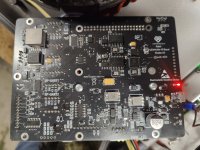
The red LED on the bottom is on. So is mine. So everything is good. How did you get along?

Btw: with my new ACX265, I had the same error as you. It wasn‘t your fault. The C-compiler seems to be stricter in newer versions.
Alexander fixed this in the latest Sunray! Its only one line of code in the CMakeLists.txt to ignore the declaration error. 🙈
 
Zuletzt bearbeitet:
Yes, everything is fine.
I got my pi4 refunded. And now I'm waiting for my Orange pi.
Perfect, I can't wait to try the new version :)
 
Hello everyone,

I finally have some good news: I managed to mow my 2,000 m² without burning anything :)
Thanks for your help :)

There's only one small problem left: the cutting motor is spinning slowly in one direction, with an abnormally high current. To the point of going into overload mode. And when it changes direction, everything's fine :)

I replaced the motor; it was badly oxidized and the bearings were worn out. But the problem remains the same.

KadaverJoe, could you give me some information on how the bumper works?
 
Hello Reihtaug,

You use the original BG3633 mowing motor, right? Then you need to make some changes to the mower driver (see post here: https://forum.ardumower.de/threads/husqvarna-acx-265-rtk-mod-teil-2.25641/post-67571). The reason, that it works in one direction fine and in the other not is the hall-sensor inside the motor, which seems to have an offset. So in one direction, the driver needs to offset this into the opposite. Thats why we need to tell him the zero offset. It only helps for the "other" direction. I set mine to 0.95 to 1.0. That should be the sweet spot. But the motor needs to know in which direction the offset is. Thats why you need to change the sensor direction to CW.
I told Alexander to change the default settings to those I mentioned. We did a lot of trial&error earlier this year so I did not remember which changes we actually had to do.
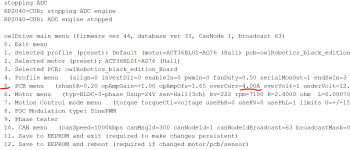
I changed these settings on the mowing motor:
  • overVolt=0
  • zeroOfs=0.95
  • senDir=CW
Do you know how to change these? You find information in the manual on page 14. I had the problem, that the motor goes in overload error, when you start it or you stop it. What helped me (and I got totally rid of it) was plugging in the micro-USB cable to the mow-driver and connect it to the Pi. The nice thing about that is also, that I can configure the driver settings over the Pi and I don't need to open the mower for that. ;)

Regarding Bumper and Lift:
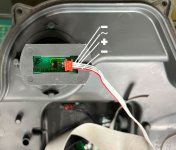
Bumper-Lift-Pinout.jpg

This ist the pinout of the connectors. I used an Arduino Leonardo for the Bumper-Lift- and Sonar control. On my first Automower, I soldered the cables directly onto the Leonardo but that only lasted for a couple of months. So on my second Automower, I crimped them and then put the signal (~) wires on the Leonardo and build a little power distribution board next to the Leonardo (kind of a breadboard) where I put all - (well, only one of every sensor, not both :ROFLMAO:) and + wires onto the board. Then I only put one - and + wire to the Leonardo. That works pretty good! The Leonardo itself has a tiny code, which only decides when to raise the signals of bumper/lift/slowdown. For example:
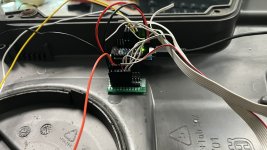
If lift is triggered: Lift signal HIGH
If bumper left or bumper right is triggered: bumper signal HIGH
If sonar distance is below a set threshold: slowdown request HIGH
So from the Arduino you need to connect one bumper, lift, GND and 5V (and the slowdown-request if you want to use the sonar) to the owl Board.

IMG_4213.jpg

I uploaded the code for you here. I would recommend to start first only with bumper and lift and if you want to integrate the Sonar as well, try the other code. But I think, you need an "external" powersupply as I am not too sure, why it is not really working on my new mower. On my old mower it works good. There, I have the Arduino connected via USB to the Pi.
One more thing: if you are looking for the right connector for the sonar board, its a JST PH 2.0 mm 4 pin connector. I bought some on ebay as the original-cable of the harness is very short. ;)

Good luck and let me know how you get along!
 
Zuletzt bearbeitet:
Quick update on my ACX265 conversion:
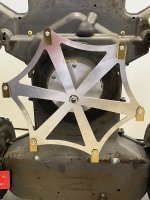
I didn’t like that the cutting disc on the Husqvarna is slightly tilted forward, which doesn’t produce a perfectly even cut — even though that’s admittedly complaining on a high level.
However, this modification is also interesting in case the mowing motor ever fails.
I replaced the motor plate with a new, flat stainless-steel mounting plate and installed a 120 W ACT brushless motor.
The cutting disc is laser-cut from 3mm aluminum, 32 cm in diameter (about 35 cm with the blades).
Why aluminum instead of stainless steel?
If the blades hit a large stone or something similar, something should give way that’s easy and inexpensive to replace — in this case, the cutting disc itself.
We’ve had good experiences with this approach, since the disc is still quite sturdy and can handle small stones without bending.
Another plus: the disc runs relatively quietly, even at high speeds. Thanks to the laser cutting, it’s well balanced and just hums along nicely.

1761819119892.jpeg
 
Zuletzt bearbeitet:
Hello,

Thanks Konrad, thanks to your message I’ve made a lot of progress :)

Regarding the bumper, it works perfectly.
I even reused the same system for my Ardumower 1.4 mounted in a 230 ACX chassis.

It took me a while to reply because I ran into quite a few issues with the wheel motors.
My controllers were preconfigured for Linix motors.
I hadn’t checked that, and everything was working pretty well… until the winding of one motor burned out.
The short circuit also damaged the controller (the new motor was jerking at high speed).

Anyway, my robot is operational again now.
The rotation speed issue is also resolved.

I only have one problem left: I still get motor errors on the cutting motor.
I don’t understand why, and it doesn’t seem to happen under any particular conditions.
To get it running again, I have to completely restart the robot.

I’m this close to installing an ACT 57BL05 ^^
 
Hello,
I don't have any details about the error.
I find the robot stopped, and on the app, I see "error motor."
If I restart the mowing, it won't start the cutting motor.
However, I can send it back to its base. So the wheel motors aren't faulty.
To restart the robot, I have to cut the main power.
Restarting Sunray isn't enough.
 
Hello Bernds,

Yes, indeed, I had left it at 4 amps.
I copied Kadaverjoe's settings.
Isn't 8 amps a problem for a 125/24 controller?
 
Try another test with 8A overCurr and connect a USB cable between the Pi and the mowing motor driver. This helped me with solving the motor error issue.
With the USB cable plugged in permanently, I set my overCurr back to 4A and it works fine since then.
 
Oben