
EinEinfach
Well-known member
Hallo zusammen,
ich habe eine Möglichkeit eingebaut über MQTT Befehle an CaSSAndRA zu schicken. Aktuell ist die Anzahl der Möglichkeiten relativ überschaubar, ist aber bei Bedarf erweiterbar. Da ich nicht weiß, wer was alles damit so vor hat, habe ich erstmal nur ein paar Sachen eingebaut, was ich so denke notwendig wäre. In der Theorie könnte man ntürlich die API so aufbohren, dass jeder Befehl möglich wäre, so dass man jedes beliebiges Frontend draufsetzen könnte, wenn der Dash nicht mehr einem gefällt.
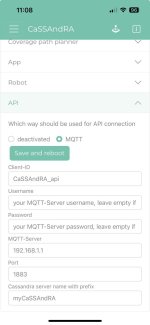
Wechselt in Settings und geht zu API, dort klickt MQTT und gibt eure Daten ein, danach speichern und lässt den Backendserver neustarten
Wenn alles richtig eingegeben wurde, müsstet Ihr folgende Nachrichten sehen:
- status
- robot
- maps
- tasks
- mow parameters
- map
- coords (nur auf Anfrage)
Die Befehle werden auf den api_cmd Topic gesendet. Erwartet wird ein JSON-String:
1. Karte wechseln:
2. Task auswählen:
jeweils Verfügbare Namen seht ihr in dem maps bzw. tasks topic.
3. Mähen (alles):
Mähen (task):
Mähen (selection):
4. Stopp:
5. Dock:
6. Ändern der Mähparametern:
auch einzeln möglich
7. Selection setzen:
8. Robot bewegen (Befehl muss permanent gesendet werden ca. alle 0.1s):
9. Anfrage der Koordinaten der aktuellen Karte:
danach stehen die Kooordinaten der akutellen Karte im coords topic zur Verfügung.
Viel Spaß beim Testen, Wünsche gerne hier oder auf GitHub posten
Update 30.09.2024
Obstacles over api
---------------------------------------------------------------------------------------------------------
Hello everyone,
I've added a feature to send commands to CaSSAndRA via MQTT. Currently, the number of available options is relatively limited, but it can be expanded if needed. Since I don't know what everyone plans to do with it, I've initially incorporated a few things that I believe are necessary. In theory, the API could be expanded to support any command, allowing you to use any frontend you prefer if you no longer like the Dash.
To set it up, go to Settings, then select API, click on MQTT, enter your data, save, and restart the backend server.
If everything is entered correctly, you should see the following messages:
You can find available names in the "maps" and "tasks" topics.
1. Switch map:
2. Select task:
3. Mow (all):
Mow (task):
Mow (selection):
4. Stop:
5. Dock:
6. Change mow parameters:
auch einzeln möglich
7. Set selection:
8. Robot move (command should be sent continuously approx. every 0.1s):
9. Get coordinates of current map:
after that CaSSAndRA will publish coordinates of current map in GeoJSON format (coords topic)
Enjoy testing, and feel free to share your feedback and wishes here or on GitHub.
Update 30.09.2024
Obstacles over api
ich habe eine Möglichkeit eingebaut über MQTT Befehle an CaSSAndRA zu schicken. Aktuell ist die Anzahl der Möglichkeiten relativ überschaubar, ist aber bei Bedarf erweiterbar. Da ich nicht weiß, wer was alles damit so vor hat, habe ich erstmal nur ein paar Sachen eingebaut, was ich so denke notwendig wäre. In der Theorie könnte man ntürlich die API so aufbohren, dass jeder Befehl möglich wäre, so dass man jedes beliebiges Frontend draufsetzen könnte, wenn der Dash nicht mehr einem gefällt.
Wechselt in Settings und geht zu API, dort klickt MQTT und gibt eure Daten ein, danach speichern und lässt den Backendserver neustarten
Wenn alles richtig eingegeben wurde, müsstet Ihr folgende Nachrichten sehen:
- status
- robot
- maps
- tasks
- mow parameters
- map
- coords (nur auf Anfrage)
Die Befehle werden auf den api_cmd Topic gesendet. Erwartet wird ein JSON-String:
1. Karte wechseln:
Code:
{"maps": {"command": "load", "value": ["map name"]}}
Code:
{"tasks": {"command": "select", "value": ["task name"]}}3. Mähen (alles):
Code:
{"robot":{"command": "mow", "value": ["all"]}}
Code:
{"robot":{"command": "mow", "value": ["task"]}}
Code:
{"robot":{"command": "mow", "value": ["selection"]}}
Code:
{"robot":{"command": "stop"}}
Code:
{"robot":{"command": "dock"}}
Code:
{"map":{"command": "setMowParameters", "value":{"mowPattern": "lines", "width": 0.18, "angle": 10, "distanceToBorder": 2, "mowArea": true, "borderLaps": 2, "mowExclusionBorder": true, "mowBorderCcw": true}}}7. Selection setzen:
Code:
{"map":{"command":"setSelection", "value":{"x": [0, 1, 1], "y": [0, 1, 0]}}}
Code:
{"robot":{"command":"move", "value":[wert für linear speed, wert für angular speed]}}
Code:
{"coords":{"command":"update", "value":["currentMap"]}}Viel Spaß beim Testen, Wünsche gerne hier oder auf GitHub posten
Update 30.09.2024
Obstacles over api
Code:
{"coords": {"command": "update", "value": ["obstacles"]}}
Code:
{"map": {"command": "resetObstacles", "value": []}}Hello everyone,
I've added a feature to send commands to CaSSAndRA via MQTT. Currently, the number of available options is relatively limited, but it can be expanded if needed. Since I don't know what everyone plans to do with it, I've initially incorporated a few things that I believe are necessary. In theory, the API could be expanded to support any command, allowing you to use any frontend you prefer if you no longer like the Dash.
To set it up, go to Settings, then select API, click on MQTT, enter your data, save, and restart the backend server.
If everything is entered correctly, you should see the following messages:
- status
- robot
- maps
- tasks
- mow parameters
- map
- coords (only on request)
You can find available names in the "maps" and "tasks" topics.
1. Switch map:
Code:
{"maps": {"command": "load", "value": ["map name"]}}
Code:
{"tasks": {"command": "select", "value": ["task name"]}}
Code:
{"robot":{"command": "mow", "value": ["all"]}}
Code:
{"robot":{"command": "mow", "value": ["task"9}}
Code:
{"robot":{"command": "mow", "value": ["selection"]}}
Code:
{"robot":{"command": "stop"}}
Code:
{"robot":{"command": "dock"}}
Code:
{"map":{"command": "setMowParameters", "value":{"mowPattern": "lines", "width": 0.18, "angle": 10, "distanceToBorder": 2, "mowArea": true, "borderLaps": 2, "mowExclusionBorder": true, "mowBorderCcw": true}}}7. Set selection:
Code:
{"map":{"command":"setSelection", "value":{"x": [0, 1, 1], "y": [0, 1, 0]}}}
Code:
{"robot":{"command":"move", "value":[value for linear speed, value for angular speed]}}
Code:
{"coords":{"command":"update", "value":["currentMap"]}}Enjoy testing, and feel free to share your feedback and wishes here or on GitHub.
Update 30.09.2024
Obstacles over api
Code:
{"coords": {"command": "update", "value": ["obstacles"]}}
Code:
{"map": {"command": "resetObstacles", "value": []}}
Zuletzt bearbeitet:
