Du verwendest einen veralteten Browser. Es ist möglich, dass diese oder andere Websites nicht korrekt angezeigt werden.
Du solltest ein Upgrade durchführen oder einen alternativen Browser verwenden.
Du solltest ein Upgrade durchführen oder einen alternativen Browser verwenden.
RTK problem with Alfred
- Ersteller firegamer56
- Erstellt am
firegamer56
Member
Könnte mir jemand die Konfigurationsdateien für die Basis und die Roboterversion 1.51 zur Verfügung stellen?

The config files have nothing to do with sunray directly. Sunray configures the ublox by itself.
A log of you both would be very helpful to understand the problem...
You could also try to downgrade the ublox back to v1.32. With that one, it should safe work!
firegamer56
Member
Verdammt, ich verstehe nicht, warum die Konfiguration danach nicht funktioniert. Ich werde wieder einige Tests machen, aber ich kann nicht sehen, woher es kommt. Was sollten Logs @KadaverJoe sein?when trying to configure the rover ublox it refuses to use the configuration files from sunray, as the update is a 1.51 software version and the config files on sunray are for older software versions
you can save a log of sunray. I your console, go to the sunray folder (cd Sunray/linux) and then run ./service.sh. There is a log menu where you can save a recent sunray log. You can download it for example withe an FTP program like FileZilla.
firegamer56
Member
I've already tried to downgrade it and it doesn't change anythingYou could also try to downgrade the ublox back to v1.32. With that one, it should safe work!
For 1.51 version You can try with the ardusimple config file (work for me) ,Maybe you lost the sat number in sunray app ,but fix is OK.I've already tried to downgrade it and it doesn't change anything
Deactivate gps_config into config.h
//#define GPS_CONFIG true // configure GPS receiver (recommended - requires GPS wire fix above! otherwise firmware will stuck at boot!)
#define GPS_CONFIG false // do not configure GPS receiver (no GPS wire fix required)
Alexander now upgraded sunray. You can now upgrade the ublox firmware via the Raspberry directly. Also sunray will now show the current ublox firmware version in the logs.
If you want to try the ublox update via Raspberry, you first need to update sunray (git pull in the Sunray folder),then go to the following folder: Sunray/ublox_f9p_configs
then you run the flash script (sudo ./flash.sh) and it should show your ublox receiver. You could also simply press Enter or type the number of the ublox device.
After that, you should see all relevant info of you actual ublox firmware etc. and then you can select which one you like to flash. I selected (5) for the latest. Version 1.32 should also work with the latest sunray version!
Next and last step is to select the flash method. Here I chose 1) Python and then the ublox gets flashed! Pretty cool!
edit: Alexander just updated the service script as well and you could now run the Update with the ./service.sh. You find the options under "Update menu".
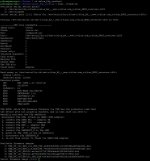
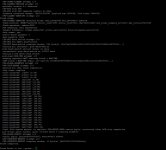
If you want to try the ublox update via Raspberry, you first need to update sunray (git pull in the Sunray folder),
then you run the flash script (sudo ./flash.sh) and it should show your ublox receiver.
After that, you should see all relevant info of you actual ublox firmware etc. and then you can select which one you like to flash. I selected (5) for the latest. Version 1.32 should also work with the latest sunray version!
Next and last step is to select the flash method. Here I chose 1) Python and then the ublox gets flashed! Pretty cool!
edit: Alexander just updated the service script as well and you could now run the Update with the ./service.sh. You find the options under "Update menu".
Zuletzt bearbeitet: