Umfrage Odometrie

Wenn Du eine Odometrie-Interrupt Routine bauen willst die schnell ist (nicht getestet, zeigt nur das Prinzip - Funktionsaufrufe sind zu vermeiden, da diese unnötig Zeit kosten):


Code:
volatile byte oldOdoPins = 0;

// Interrupt-Code so kurz wie nötig
ISR(PCINT2_vect, ISR_NOBLOCK) {
  const byte actPins = PINK; // PINK-Register lesen (enthält auch die Pins PK4, PK6)
  // match this values agaist the oldPins bitmask (XOR for changing edge)
  // Wir nutzen XOR um den Wechsel von Pins zu erkennen (0 XOR 0=0, 1 XOR 1=0, 1 XOR 0=1, 0 XOR 1=1)
  const byte setPins = (oldOdoPins ^ actPins);
  if (setPins & 0b00010000){ // Pin Left hat sich geändert
    if (robot.motorLeftPWMCurr >=0) robot.odometryLeft++; else robot.odometryLeft--;
  } 
  if (setPins & 0b01000000){ // Pin Right hat sich geändert
    if (robot.motorRightPWMCurr >=0) robot.odometryRight++; else robot.odometryRight--;
  }
  oldOdoPins = actPins; // remember old pin states
}


Das Auslesen des ADC hingegen geht schon über Register, das wird man kaum schneller bekommen.
 
HI Roland.
50 deg is what i read in the specification of your link (Angle less than 50 Degres).
For the bumper see the Alexander mower ,it drive in reverse mode and need to have left and right sensor to manage then reverse mode in Obstacle Détection..
No problem if you want to open a new thread about Bumper and Obstacle Detection.
Have a good day.
By.
 
Hi Alexander and all member of this forum.

Adc and interrupt are very complexe for me but Odometry work very well in AZURIT without slowing the code and me too i think the soft don't need the TwoWayodometryuse.

Congratulation with perimeter sender and receiver they work perfectly.

As i tell in my precedent post i made some change in perimeter tracking to smooth it and the result work well but i need some help whith the code.

I want to add a new state STATE_PERI_OBSTACLE_AVOID to avoid the mower alway do the same traject when obstacle on the perimeter.
I add variable name motorSpeedPeriMaxPwm and need to store it and change it in Pfod.

So please can you tell me if there is special thing to do with eereadwrite(readflag, addr, myvariable) and what is MAGIC 52 ??????

Can i simply add
eereadwrite(readflag, addr, motorSpeedPeriMaxPwm);
before
eereadwriteString(readflag, addr, esp8266ConfigString);
Line 333 of Robot.cpp Azurit 6
or is there an order to respect.

For Pfod i think i can manage it with Web help, but for the rest please where can i find explanation or help.

Is it possible to add Topics name AZURIT Software explanation and test and SUNRAY Software explanation and test to help beginer user.
Because for example i don't know exactly who in the forum write, know the code and can help simple user.
For example I create an account on Github but don't understand how it's work.

Again Thanks for all and sorry to post in English.
 
StefanM schrieb:
Der Einwand das dann immer die Platine ausgebaut werden muss kann ich da nicht gelten lassen. Ich muss ohnehine wenn ich Änderungen mache den Arduino neu flaschen. Entweder ein Kabel angeschlossen lassen, hab ich bei mir so oder wie von Alex beschrieben mit Raspberry per Wlan, was absolut Cool ist.

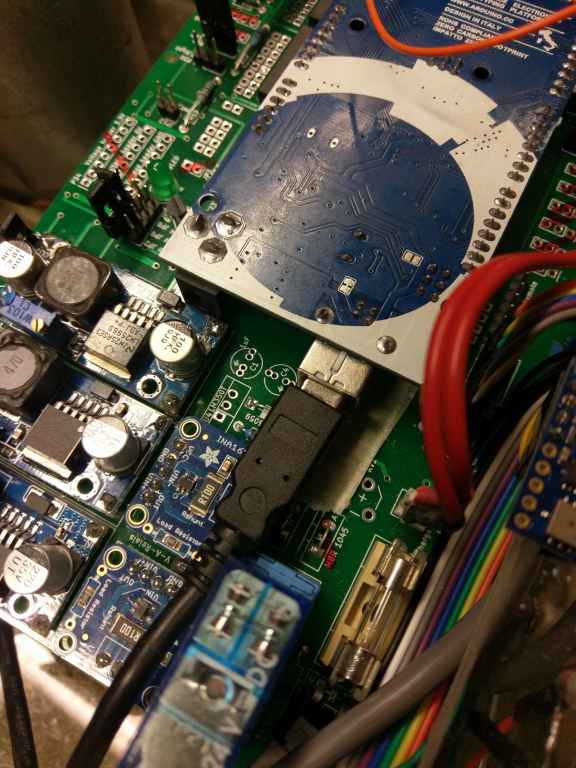
Da du explizit auf meinen Einwand eingehst, antworte ich direkt auf deinen Post: Ist mir eigentlich völlig egal, was du gelten lässt oder nicht, aber es ist nunmal Fakt, dass der Mäher jetzt so aufgebaut ist und sich nicht ohne weiteres flashen lässt, ohne ihn ziemlich umfangreich auseinanderzubauen. Da beim Mega der USB-Port leider falsch herum montiert ist, wenn man ihn kopfüber auf eine große andere Platine steckt, funktionieren auch die handelsüblichen gewinkelten USB-Stecker nicht. Und da ich bisher keine wirkliche Lust dazu hatte, den Mäher wieder auseinanderzunehmen, hab ich auch weder die BT- als auch die WLAN-Flashlösung umgesetzt. Da aber die Flashlösungen nicht "offizielle" Lösungen sondern mehr oder weniger "Schaut-mal-so-gehts-auch"-Lösungen sind, finde ich es schon relativ dreist, diese Lösungen dann vorzuschreiben ... falls die Lösungen allerdings beide schon den Weg in die Wiki gefunden haben, und ich sie nur nicht gefunden habe, dann nehme ich alles zurück und behaupte das Gegenteil, würde mich dann aber über den direkten Link zum Artikel freuen.

StefanM schrieb:
Auch das einbinden von Pins mit "#if define" werde ich für mich mal probieren. Ich weis ja was ich für Hardware verbaut habe und was ich brauche, ansonsten wird er halt neu geflasht.

Und genau das lässt sich nur machen, wenn man einfach flashen kann. Allerdings kann man dann eh die komplette Parametrierung als Compilerschalter ausführen und spart sich eine Menge Code für die Andoidapp. Entweder ganz oder gar nicht. Meine Meinung ... mischen dieser beiden Konzepte finde ich nicht unbedingt den besten Stil.

Gruß,
Jem
 
Zuletzt bearbeitet von einem Moderator:
Jem,

ich will keinem was vorschreiben und kann deine Reaktion nicht Nachvollziehen, sorry.

Offensichtlich ist dein Mower fertig aufgebaut, an dem du nichts, außer ein paar Einstellungen änderst und auch keine andere Software aufspielen kannst, willst, muss, da du ja an deinen USB Port nicht dran kommst.

Also kann es dir doch egal sein, was in Zukunft weiter gemacht wird, da du deinen Mower ja nicht auseinander bauen willst, was ja auch völlig ok ist, wenn du zufrieden bist.

Im übrigen wiedersprichst du dir selbst, also lass gut sein.

Der Hinweis mit dem Raspberry war ja nur gut gemeint um die eine Möglichkeit zu zeigen, wie DU das ändern könntest,
was du nichts willst.

Sorry wenn du da was in den falschen hals bekommen hast und übrigens kann den USB Stecker sehr wohl im Board stecken lassen, wenn auf der Platine eingebaut ist.


IMAG1140.jpg


Stefan
Attachment: https://forum.ardumower.de/data/media/kunena/attachments/1535/IMAG1140.jpg/
 
Zuletzt bearbeitet von einem Moderator:
So ich hab jetzt für mich eine Lösung gefunden, die funktioniert :


Code:
#ifdef __AVR__
ISR(PCINT2_vect, ISR_NOBLOCK){
#else
ISR(PCINT2_vect){
#endif
  unsigned long timeMicros = micros();

#define twoWayOdometrySensorUse 0 // uncoment when use two-wire odometry with Interrupt


#if defined(twoWayOdometrySensorUse)
  boolean odometryLeftState = digitalRead(pinOdometryLeft);
  boolean odometryRightState = digitalRead(pinOdometryRight);
  boolean odometryLeftState2 = digitalRead(pinOdometryLeft2);
  boolean odometryRightState2 = digitalRead(pinOdometryRight2);  
#else
  boolean odometryLeftState = digitalRead(pinOdometryLeft);
  boolean odometryRightState = digitalRead(pinOdometryRight);  
  boolean odometryLeftState2 = 0;
  boolean odometryRightState2 = 0;  
#endif


Er fährt gerade aus !

Was wir Ihr daraus jetzt machen, weis ich auch nicht, fände es aber schön eine Einheitliche Lösung zu haben, die für alle funktioniert.

Mein Vorschlag währe generell auf die Two Way Odometrie zu verzichten, was aber einige nicht möchten, also keine Ahnung wie man das am besten lösen kann.
Stefan
 
Zwei Sachen sind mir nur noch aufgefallen.

Die Odometrie arbeitet auch wenn der Mower off ist. Wenn man ein Rad, von Hand dreht, dreht das andere auch. Die Odometrie arbeitet also weiter.

Der Mower reagiert nicht mehr richtig bei Überstrom, also wenn er hängen bleibt, fährt er zurück, dreht aber nicht und fährt wieder auf das Hindernis. Bei ausgeschalteter Odometrie dreht er.

Stefan
 
Hi Stephan.

Sorry for English.
With Azurit 1.06
I test your change. But now In manual Left or Right don't work there is other change to do in AZURIT to not manage the TwoWayOdo.

I have also the problem in OFF the Wheel left or Right turn until you have same ODO left and right.

But in all case it's not change the speed of the prog.
All my test result with Mega are minimum 40 ms to manage 1 perimeter coil and 2 two motor Wheel whithout IMU.

I am going to search where is the bug because your change normaly don't crash the Manual Mode ????

By
 
Hi.
Problem is that the odometry use interrupt so don't stop to count if the mower is OFF.

Here change i made to
Don' t use the twowayodometry and prefer to use the odometryLeftState2 to double the tick per Wheel turn.
Before i put 720 ticks and now it's 1440 so don't forget to change it in mower.cpp or Pfod and twoWayOdometrySensorUse=1.


Code:
void Robot::setOdometryState(unsigned long timeMicros, boolean odometryLeftState, boolean odometryRightState, boolean odometryLeftState2, boolean odometryRightState2) {

  int leftStep = 1;
  int rightStep = 1;
  if (odometryLeftSwapDir) leftStep = -1;
  if (odometryRightSwapDir) rightStep = -1;

  if ((odometryLeftState != odometryLeftLastState) &&  (motorLeftPWMCurr != 0) )  { //add  motorLeftPWMCurr != 0 to not count if OFF
    if (odometryLeftState) {
      if (motorLeftPWMCurr > 0) odometryLeft ++; else odometryLeft --;
    }
    odometryLeftLastState = odometryLeftState;
  }

  if ((odometryRightState != odometryRightLastState) &&  (motorRightPWMCurr != 0)) {
    if (odometryRightState) {
      if (motorRightPWMCurr > 0) odometryRight ++; else odometryRight --;
    }
    odometryRightLastState = odometryRightState;
  }
  if (twoWayOdometrySensorUse) {
    if ((odometryLeftState2 != odometryLeftLastState2)  &&  (motorLeftPWMCurr != 0)) {
      if (odometryLeftState2) {
        if (motorLeftPWMCurr > 0) odometryLeft ++; else odometryLeft --;
      }
      odometryLeftLastState2 = odometryLeftState2;
    }

    if ((odometryRightState2 != odometryRightLastState2) &&  (motorRightPWMCurr != 0)) {
      if (odometryRightState2) {
        if (motorRightPWMCurr > 0) odometryRight ++; else odometryRight --;
      }
      odometryRightLastState2 = odometryRightState2;
    }

  }
}


To be sure you can add at the end off the Robot::loop


Code:
if (stateCurr != STATE_REMOTE) motorMowSpeedPWMSet = motorMowSpeedMaxPwm;

  if (  ((stateCurr == STATE_OFF) || (stateCurr == STATE_STATION) || (stateCurr == STATE_ERROR)) && (millis() - stateStartTime > 1000)  ) {
    motorLeftPWMCurr = 0;
    motorRightPWMCurr = 0;
    setMotorPWM( 0, 0, false );
  }

  bumperRight = false;
  bumperLeft = false;


Don't understand why but these line are in Robot::motorControlImuDir() ???.

Work for me Hope for you too.
By
 
Das Problem das sich die Motoren auch im off Zustand drehen, ist auch in der Original Version vorhanden und liegt nicht an meinen Änderungen, das ist klar.

Ich werde deine Änderungen mal testen.

Bei TW den zweiten Kanal zur Verdoppelung der Ticks zu Verwenden bringt, glaube ich eher nachteile, als Vorteile.
Bei TW sitzen zwei Hallgeber etwas versetzt um die dreh Richtung zu erkennen. Angegeben werden aber Ticks per CM.
Jetzt kommt mal ein Tick nach 1cm, der nächste dann aber schon nach 0,3 cm als Beispiel.


index.php


Stefan
 
Was mir beim Code aufgefallen ist, die ISR sollte ja möglichst kurz seine, um den Mower nicht zu Blockieren.
Aber in der ISR wird die Robot::setOdometryState auferufen und abgearbeitet, was Zeit kostet, währe es nicht möglich, die Ticks zu sammeln und dann, wenn die Motorregelung dran ist diese auszuwerten ?

Dadurch würde die ISR schneller abgearbeitet und die Räder würden sich nicht mehr drehen können wenn der Mower OFF ist.

Stefan
 
Hi Stephan.
2 Problems.

1 The motor move when OFF

Because the original line test motorPWMCurr > or = 0 the count always increase when 0 so State_OFF:
if (motorLeftPWMCurr >= 0) odometryLeft ++; else odometryLeft --;
You need to remove the = and make the test only if motorPWMCurr not egal 0
if ((odometryLeftState != odometryLeftLastState) && (motorLeftPWMCurr != 0) ) {

To make very simple change in 1 line
add this line after Robot::setOdometryState :

if ((motorLeftPWMCurr == 0) && (motorRightPWMCurr == 0)) return;


2 The Speed of the mega.
Don't understand where is your problem maybe if you use the IMU because for me the Mega run well with or without the Twowayodometrie.
The most longueur think is the perimeter decode.

Here the result of line i add for debug the perimeter tracking
If you look at the MAG (Result of perimeter decode)


check the perimeter while tracking each 50ms the value of Mag is read and always change

Millis ; 34545; MAG: ;173; Leftspeed: ;73; Rightspeed: ;66; PerimeterPID.x: ;
Millis ; 34595; MAG: ;70; Leftspeed: ;71; Rightspeed: ;68; PerimeterPID.x: ;
Millis ; 34646; MAG: ;-75; Leftspeed: ;69; Rightspeed: ;70; PerimeterPID.x: ;
Millis ; 34695; MAG: ;-100; Leftspeed: ;69; Rightspeed: ;70; PerimeterPID.x: ;
Millis ; 34745; MAG: ;66; Leftspeed: ;71; Rightspeed: ;68; PerimeterPID.x: ;
Millis ; 34795; MAG: ;-96; Leftspeed: ;69; Rightspeed: ;70; PerimeterPID.x: ;
Millis ; 34845; MAG: ;108; Leftspeed: ;72; Rightspeed: ;67; PerimeterPID.x: ;


If i check each 30ms you can see that the value of Mag is not read each time.

Millis ; 19603; MAG: ;-408; Leftspeed: ;67; Rightspeed: ;72; PerimeterPID.x: ;-0.27
Millis ; 19633; MAG: ;-408; Leftspeed: ;65; Rightspeed: ;74; PerimeterPID.x: ;-0.27
Millis ; 19682; MAG: ;-548; Leftspeed: ;64; Rightspeed: ;75; PerimeterPID.x: ;-0.37
Millis ; 19713; MAG: ;-548; Leftspeed: ;63; Rightspeed: ;76; PerimeterPID.x: ;-0.37
Millis ; 19762; MAG: ;-556; Leftspeed: ;64; Rightspeed: ;75; PerimeterPID.x: ;-0.37
Millis ; 19793; MAG: ;-556; Leftspeed: ;63; Rightspeed: ;76; PerimeterPID.x: ;-0.37
Millis ; 19840; MAG: ;-570; Leftspeed: ;63; Rightspeed: ;76; PerimeterPID.x: ;-0.38

Hope it can help.
 
Hi Boilevin,

i have no Problem with the Perimeter Tracking.

IMU is for me not usable, in the moment.
I m looking for an Odometry Solution that's works for everybody and perhaps make it a little bit faster.

While looking at the code and understand more and more, i see that the ISR call an Subroutine Robot::setOdometryState
so the calculation is direct call from the interrupt and stop every thing else. So my question was if it is not better to collect the ticks and make the Calculation in loop.

To use both ticks from the Odometry to double the ticks don't help, because the second signal is short after the first, then you have a longer pause and the second Signal again. Do you understand what i mean ?

Have a look at the picture from my other post, there you can see what i mean.


Sorry my English is very rusty ;)
 
Ich habe die diversen Änderungen bzgl. ODO und aktivierung der Interrupts jetzt im Git.
Außerdem habe ich das zufällige drehen am Perimeter mit IMU eingebaut.

Wer kann bitte testen und bei Problemen bitte melden B)

VG
Reiner

***EDIT***
Ich habe meinen Teiler wieder ausgebaut und gerade bemerkt dass wir ja jetzt bei JEDEM Flankenwechsel zählen. Daher bitte bei "TicksPerOneFullRevolution" einen Wert von 2120 und bei "Ticks per cm" einen Wert von 27 für die Motore und Räder aus dem Shop einstellen.

Dazu in der Datei pfod.cpp folgende Änderungen machen:

Zeile 708: sendSlider("l04", F("Ticks per one full revolution"), robot->odometryTicksPerRevolution, "", 1, 2120);
Zeile 709: sendSlider("l01", F("Ticks per cm"), robot->odometryTicksPerCm, "", 0.1, 27);
 
Hi Stephan.

Sorry for the term 'Debug' the perimeter work but not smothly at all it's why i work on it.

You wrote.
I see that the ISR call an Subroutine Robot::setOdometryState so the calculation is direct call from the interrupt and stop every thing else. So my question was if it is not better to collect the ticks and make the Calculation in loop.

I understand and think it's not faster but to be tested ??
To be faster the only solution is to don t read the interupt of The second canal like you say in precednt post But for me i prefer to read it and increase the ticks /cm of the mower.

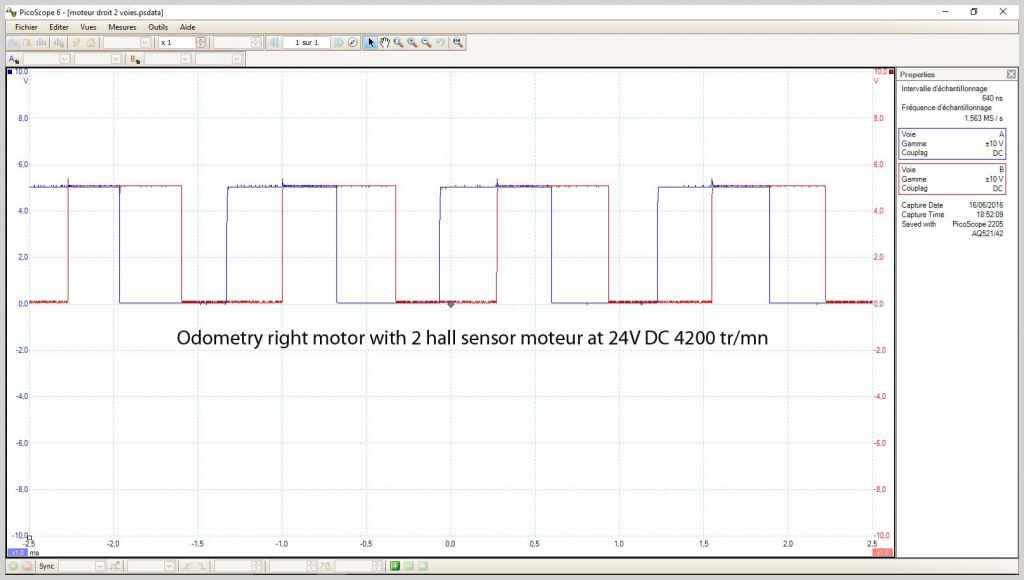
i view this post and know the signal of odo
The second canal is exactly in the middle so it' double the precision of the Odometry.

Here the Scope off my motor at full speed.
Red sig is first canal Blue is the second

Odometrymoteur1.jpg


thanks.
Have a good week end
Attachment: https://forum.ardumower.de/data/media/kunena/attachments/3545/Odometrymoteur1.jpg/
 
Zuletzt bearbeitet von einem Moderator:
Oben