Problems with Sunray and FIX (Solved)

If you use the two 868Mhz SMA antennas and coaxial cables of the building set, then I think there is a problem on the configuration.

Did you have made the connection between the IOREF tp 3.3V, like on the picture only on the rover Ubloxx modul? I did not see it on your videos, but I cannot see behind the bottom side. And check again the conncetion between the Ubloxx modul and the PCB1.4.
Anhang anzeigen 5942


The LED´s on both cards are described in the Ardumower Wiki under Sunray.
Anhang anzeigen 5938

Check also the XBee configuration, in some moduls was the configuration not correct:
Anhang anzeigen 5939

Here the XBee settings. The settings are on both XBees the same.
Anhang anzeigen 5940

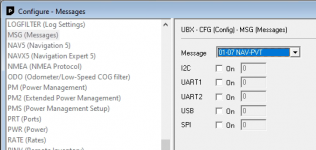
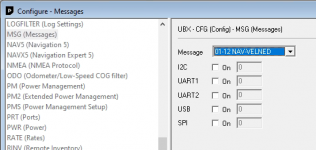
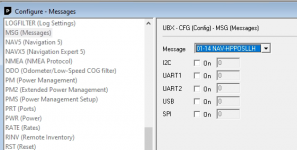
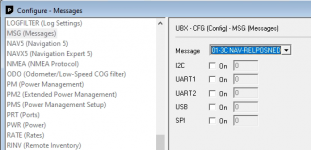
Check also the Ublox card settings, on some cards was not installed the right configurations.
Anhang anzeigen 5941
Hello,
Finally, how can I see this list in the u-center program?
With so many buttons and menus, I can't find a list that tells me if it matches what you mention in your post.

Thanks!
 
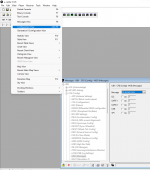
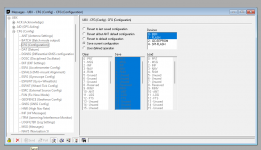
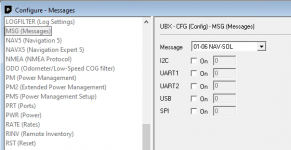
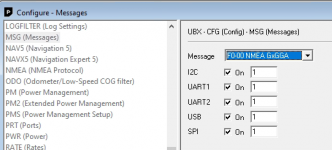
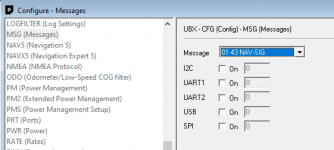
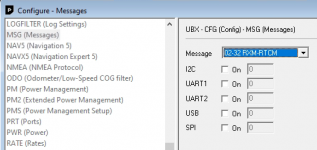
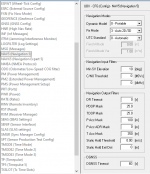
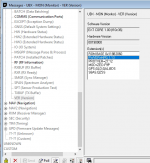
In U-center programm you find the settings under Viwe/Configuration View. In the open window you go to the UBX and there to MSG (Message), then you find on the right side of the Window Message with dropdown menu with the diffrent parameters, you have to open the rights parameters an control the settings IC2, UART1, UART2, USB and SPI. If your settings like the settings in the Ardumower Wiki, then it is ok, if not then change it . For save the configuration you have to go to CFG and then on the bottom of the Window push the button Send.

1678818684771.png
1678818931242.png
 
About the Xbee configuration, I think you set the Xbee of your RTK/GPS Station and also on your Rover to the same settings like in the Ardumower Wiki. So I hope that you solve the problems soon.
 
Hello,
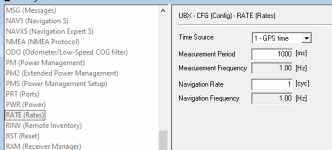
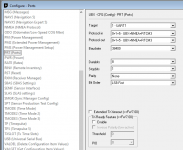
Well, I've checked u-center and I think it's totally misconfigured:

1678880223722.png


1678880234994.png
1678880244450.png
1678880251839.png
1678880263828.png
1678880272316.png
1678880285175.png
1678880293155.png
1678880300117.png
1678880307851.png

--- Continue in next post ---
 
1678880354844.png

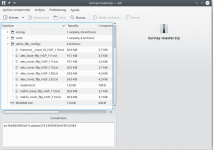
I see that there is a possibility of using a configuration file to avoid having to make the changes manually.
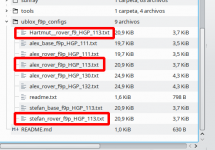
But I have a doubt about which of them to use in the Rover and in the base (if it was not well configured too):

1678880517028.png

Which of the files would you recommend?
Should I use the same version for base and rover?

I don't want to screw this up and render devices useless.

Sorry to be so meticulous and clumsy at the same time in these things.

Again thank you very much for your help.
 
Do you know which firmware is installed on your Ublox cards? In this youtube video you can see it, on 0,50 Minutes where you can see the firmware version. This video show you also the configuration update.
Ublox F9P - Konfigurieren für Cerea - YouTube

This video show you the firmware update.
ZED-F9P Firmware Update - YouTube

I can send you the configuration files for the firmware 1.32 later.

Or you set the settings like Ardumower forum.
 
Do you know which firmware is installed on your Ublox cards? In this youtube video you can see it, on 0,50 Minutes where you can see the firmware version. This video show you also the configuration update.
Ublox F9P - Konfigurieren für Cerea - YouTube
Hello,
I have the version 1.13

1678882114953.png

This video show you the firmware update.
ZED-F9P Firmware Update - YouTube

I can send you the configuration files for the firmware 1.32 later.
Perhaps it would be better to leave it as it is. I usually have very bad luck with firmware updates. Unless there is an improvement when it comes to communication, I prefer to leave it as it is.

Or you set the settings like Ardumower forum.
I'm going to try it with the correct settings from the Wiki.
I imagine it will be these then:
1678882483908.png

I'm also going to assume that I can mix base/rover with different combinations between Alex/Hartmut/Stefan.

Thank you!
 
Perhaps it would be better to leave it as it is. I usually have very bad luck with firmware updates. Unless there is an improvement when it comes to communication, I prefer to leave it as it is.
The firmware 1.32 did bring more satellites.

I'm also going to assume that I can mix base/rover with different combinations between Alex/Hartmut/Stefan.
They are diffrent in some setings. but I have not compare it.
 
Normaly Sunray send the rover configuration file on startup , check into config.h
it's #define GPS_CONFIG true ,maybe you change it to false ???

Code:
#define GPS_REBOOT_RECOVERY  true // allow GPS receiver rebooting (recommended - requires GPS wire fix above! otherwise firmware will stuck at boot!)
//#define GPS_REBOOT_RECOVERY   false  // do not allow rebooting GPS receiver (no GPS wire fix required)

#define GPS_CONFIG   true     // configure GPS receiver (recommended - requires GPS wire fix above! otherwise firmware will stuck at boot!)
//#define GPS_CONFIG   false  // do not configure GPS receiver (no GPS wire fix required)

#define GPS_CONFIG_FILTER   true     // use signal strength filter? (recommended to get rid of 'FIX jumps') - adjust filter settings below
//#define GPS_CONFIG_FILTER   false
 
Normaly Sunray send the rover configuration file on startup , check into config.h
it's #define GPS_CONFIG true ,maybe you change it to false ???

Code:
#define GPS_REBOOT_RECOVERY  true // allow GPS receiver rebooting (recommended - requires GPS wire fix above! otherwise firmware will stuck at boot!)
//#define GPS_REBOOT_RECOVERY   false  // do not allow rebooting GPS receiver (no GPS wire fix required)

#define GPS_CONFIG   true     // configure GPS receiver (recommended - requires GPS wire fix above! otherwise firmware will stuck at boot!)
//#define GPS_CONFIG   false  // do not configure GPS receiver (no GPS wire fix required)

#define GPS_CONFIG_FILTER   true     // use signal strength filter? (recommended to get rid of 'FIX jumps') - adjust filter settings below
//#define GPS_CONFIG_FILTER   false
Hello Bernard,
I have checked and it is correct.
Right now I am looking at the base configurations, as it is what remains for me to verify.

Thank you very much for your suggestion!!
Best regards.
 
Hello everyone!!
I have finally managed to fix it!!! :geek::geek::geek:
After reconfiguring the base with u-center using the Stefan file, I have connected the Base with the Rover.
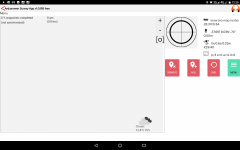
I don't know if the problem was in the Rover or Base (or both), but I have managed to get FIX/Float in the APP using my tablet.

Screenshot_20230316-122102.png

I also found a short in the MPU-6050 causing the mower to stumble, it drives very smooth now.

I really appreciate your help and I hope one day I can be useful to other forum users who have problems.

Greetings. (y)(y)
 
Maybe it is not the right place, but do you know any combination of commands in the Arduino console to make the Mower rotate and be able to calibrate it? Unfortunately I do not have material to do it as shown in the videos that I have reviewed.

Thank you!
 
Oben