
This is how I managed to compile latest Sunray firmware on Alfred:
1. Login into your Alfred (via HDMI, PUTTY/SSH, VNC or UART etc.) and open a Linux terminal.
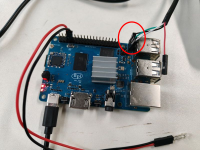
I'm using the 3-pin Debug UART connector on the BananaPI and use PUTTY to login to the PI via UART with my Laptop (using a UART-USB-adapter):
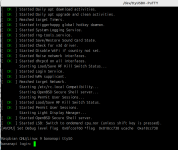
putty /dev/ttyUSB0 -serial -sercfg 115200,8,n,1,N -fn 12
login user: pi
login password: natreen
Optional: Using AnyDesk will allow you in future to access your Alfred desktop screen via the Internet from anywhere. install AnyDesk on your Alfred Linux terminal like this:
1. cd Download
2. wget https://download.anydesk.com/rpi/anydesk_6.3.0-1_armhf.deb
3. sudo dpkg -i anydesk_6.3.0-1_armhf.deb
4. echo '<choose_a_password>' | sudo anydesk --set-password
5. sudo anydesk --get-id
6. On your PC, connect to your Alfred with the displayed ID and choosen password
Optional: It's recommended to give your Alfred's Ethernet adapter a constant MAC address (as it struggles to stay constant over time):
sudo nano /etc/systemd/network/10-eth0.link
and add this:
[Match]
OriginalName=eth0
[Link]
MACAddress=00:11:22:33:44:55
2. Once logged-in, it's a good idea to add your phone as a Hotspot to the PI, so in future you can connect to the PI without any external WiFi network (just with the phone). To do so, you open a WiFi hotspot on your phone, and add it to the PI.
sudo nano /etc/wpa_supplicant/wpa_supplicant.conf and there you will add another network with your phone hotspot data:
network={
ssid="my_wifi_ssid"
psk="my_wifi_pw"
priority=1
}
network={
ssid="my_phone_hotspot_ssid"
psk="my_phone_hotspot_pw"
priority=10
}
Finally run "sudo reboot now". In future, when no WiFi network is available, you simply turn on the Hotspot on your phone and the robot will automatically connect to your phone hotspot and get Internet access etc. Your robot will be available via the usual hostname: bananapi.local
3. Stop the old Sunray Linux service:
cd sunray_install
sudo ./service
choose: 1) Stop sunray service
cd ..
4. Before we can compile the latest Sunray firmware, the Linux system needs to be updated.
Run the editor:
sudo nano /etc/apt/sources.list
and modify the existing packages source like this:
deb http://legacy.raspbian.org/raspbian/ stretch main contrib non-free rpi
Save and close the editor. Then update the package sources:
sudo apt update
Then install some missing packages:
sudo apt install cmake libbluetooth-dev libssl-dev libjpeg-dev libssl1.1
5. Build the new Sunray Linux executable:
git clone https://github.com/Ardumower/Sunray
cd Sunray/linux
./service
choose: 1) Compile and test menu
choose: 1) Build sunray executable
When being asked, choose config file: config_alfred.h
6. Finally, activate the Sunray Linux service:
./service
choose: 2) Linux services menu
choose: 2) Start sunray service (as Linux autostart)
Now the latest Sunray firmware is running on your Alfred.
1. Login into your Alfred (via HDMI, PUTTY/SSH, VNC or UART etc.) and open a Linux terminal.
I'm using the 3-pin Debug UART connector on the BananaPI and use PUTTY to login to the PI via UART with my Laptop (using a UART-USB-adapter):
putty /dev/ttyUSB0 -serial -sercfg 115200,8,n,1,N -fn 12
login user: pi
login password: natreen
Optional: Using AnyDesk will allow you in future to access your Alfred desktop screen via the Internet from anywhere. install AnyDesk on your Alfred Linux terminal like this:
1. cd Download
2. wget https://download.anydesk.com/rpi/anydesk_6.3.0-1_armhf.deb
3. sudo dpkg -i anydesk_6.3.0-1_armhf.deb
4. echo '<choose_a_password>' | sudo anydesk --set-password
5. sudo anydesk --get-id
6. On your PC, connect to your Alfred with the displayed ID and choosen password
Optional: It's recommended to give your Alfred's Ethernet adapter a constant MAC address (as it struggles to stay constant over time):
sudo nano /etc/systemd/network/10-eth0.link
and add this:
[Match]
OriginalName=eth0
[Link]
MACAddress=00:11:22:33:44:55
2. Once logged-in, it's a good idea to add your phone as a Hotspot to the PI, so in future you can connect to the PI without any external WiFi network (just with the phone). To do so, you open a WiFi hotspot on your phone, and add it to the PI.
sudo nano /etc/wpa_supplicant/wpa_supplicant.conf and there you will add another network with your phone hotspot data:
network={
ssid="my_wifi_ssid"
psk="my_wifi_pw"
priority=1
}
network={
ssid="my_phone_hotspot_ssid"
psk="my_phone_hotspot_pw"
priority=10
}
Finally run "sudo reboot now". In future, when no WiFi network is available, you simply turn on the Hotspot on your phone and the robot will automatically connect to your phone hotspot and get Internet access etc. Your robot will be available via the usual hostname: bananapi.local
3. Stop the old Sunray Linux service:
cd sunray_install
sudo ./service
choose: 1) Stop sunray service
cd ..
4. Before we can compile the latest Sunray firmware, the Linux system needs to be updated.
Run the editor:
sudo nano /etc/apt/sources.list
and modify the existing packages source like this:
deb http://legacy.raspbian.org/raspbian/ stretch main contrib non-free rpi
Save and close the editor. Then update the package sources:
sudo apt update
Then install some missing packages:
sudo apt install cmake libbluetooth-dev libssl-dev libjpeg-dev libssl1.1
5. Build the new Sunray Linux executable:
git clone https://github.com/Ardumower/Sunray
cd Sunray/linux
./service
choose: 1) Compile and test menu
choose: 1) Build sunray executable
When being asked, choose config file: config_alfred.h
6. Finally, activate the Sunray Linux service:
./service
choose: 2) Linux services menu
choose: 2) Start sunray service (as Linux autostart)
Now the latest Sunray firmware is running on your Alfred.
Zuletzt bearbeitet: